




Content ITV PRO
This is Itvedant Content department
Implementing Logic Using Conditional Statements
Business Scenario
Welcome!
Today is your fourth day as a Junior Data Analyst at the Indian Railways Reservation Department. Previously you stored passenger information and displayed the ticket details.
Today, your manager wants you to make reservation system capable to automatically check ticket status, verify passenger eligibility and display different outputs based on specific conditions.
Pre-Lab Preparation
To complete this task successfully, you must use Python to:
Check ticket status automatically
Verify passenger eligibility
Apply reservation conditions
Display outputs based on logical decisions
git pull origin branchNameGit Pull
Topic: Implementing Logic Using Conditions
1) Introduction to Conditional Statements
2) Indentation in Python
3) If, Else & Elif Statement
1
Task 1: Build a Basic Ticket Status Checker
Create variables for passenger and ticket status
passenger_name = "Rahul Sharma"
ticket_status = "Confirmed"
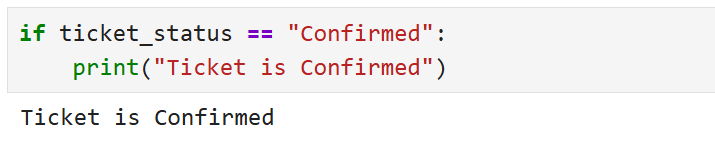
Use 'if' statement to check ticket status
2
if ticket_status == "Confirmed":
 	print("Ticket is Confirmed")
Task 2: Apply If...Else Statement for Ticket Verification
Output
3
1
Create a variable for waiting list number
Use 'if...else' statement for ticket confirmation checking
2
waiting_list = 3if waiting_list == 0:
print("Ticket Confirmed")
else:
print("Ticket is in Waiting List")Task 3: Use Elif Statement for Multiple Ticket Conditions
1
Create a variable for ticket category
ticket_status = "RAC"Output
3
2
Use if, elif, and else statements
if ticket_status == "Confirmed":
 	print("Seat Allocated Successfully")
elif ticket_status == "RAC":
 	print("Partial Reservation Available")
else:
 	print("Ticket is in Waiting List")
Task 4: Understanding Indentation in Python
1
Write a properly indented Python program
age = 65
if age >= 60:
 	print("Passenger Eligible for Senior Citizen Discount")
Output
3
Task 5: Apply Logical Operators in Railway System
1
Create passenger age and booking status variables
age = 65
is_ticket_confirmed = True
Create passenger age and booking status variables
2
if age >= 60 and is_ticket_confirmed == True:
 	print("Passenger eligible for Senior Citizen Benefits")
Output
3
Output
2
ticket_status = "Confirmed"
payment_status = "Paid"
Apply combined conditions using logical operators
2
if ticket_status == "Confirmed" and payment_status == "Paid":
 	print("Ticket Successfully Booked")
elif ticket_status == "RAC":
 	print("Partial Seat Reservation Available")
else:
 	print("Booking Pending")
Create passenger and payment details
1
Output
3
Task 6: Build Final Railway Ticket Validation System
Great job!
You have successfully learned how to use conditional statements for decision making in Python programs.
Checkpoint
Git Push
git push origin branchNameNext-Lab Preparation
Topic: Apply Conditional Logics
1) Use Logical Operators
Save the File as : ticket_status_checker.ipynb
3
By Content ITV