The DBA's Guide to Not Getting Fired - Backups 101
Jeff Taylor
Principal Data Consultant
Database Consulting, LLC

JaxData
Community
Jacksonville SQL Server Users Group
- Every 3rd Wednesday, 6-8pm
- Except for May, November and December
- Free, and everybody is welcome
- https://jaxdata.org
Day of Data
Community
Annual Free Data Conference
- One day, all data, no cost
- Speakers from all over the the world
- Bring a coworker who has never been

Jeff Taylor
Principal Data Consultant
Database Consulting, LLC






Super Hero Suit

Before we start
Poll
Who is in the room?
- Who is a DBA?
- Who is a developer who got handed the database?
- Where are your databases? On prem? Azure? AWS?
- What version are you on? 2016? 2019? 2022? Anybody on 2025 yet?
The DBA's Guide to Not Getting Fired - Backups 101
Jeff Taylor
Principal Data Consultant
Database Consulting, LLC
Database Backups 101
Questions
What is a database backup?
A copy of your data captured at a point in time, so you can put the database back the way it was.
…and it only counts if you can restore it.
Database Backups 101
Questions
- How many of you are DBA's?
- How many of you have backups of all of your databases?
- How many of you have restored one of those databases you backed up?
Database Backups 101
Questions
Why should you back up your databases?
Because that's what you were hired to do.
Database Backups 101
Questions
Why should you restore your backups?
So you don't get fired!
A backup you've never tested is a hope, not a recovery plan.
Database Backups 101
Backup Types
What Backup Types Are There?
- Full - complete copy; the baseline for everything else
- Copy Only - full-like copy that stays out of the chain
- Differential - everything changed since the last full
- Transaction Log - every change since the last log backup; enables point-in-time
- VM Snapshot - whole-server image; all-or-nothing, no point-in-time
Database Backups 101
Recovery Models
What Backup Types are supported based on your Recovery Model
- Full - Recovery Model: Full, Bulk-Logged, Simple
- Copy Only - Recovery Model: Full, Bulk-Logged, Simple
- Differential - Recovery Model: Full Only
- Transaction - Recovery Model: Full, Bulk-Logged
- VM Snapshot - Recovery Model: Full, Bulk-Logged, Simple
Database Backups 101
Recovery Model - Simple
Simple - Maximum Risk, No Point In Time Recovery
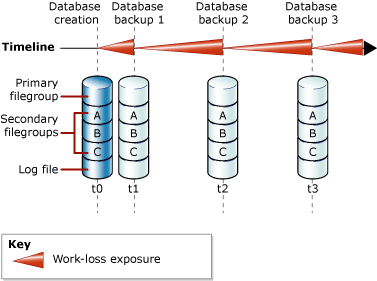
- No point-in-time recovery
- Log is auto-truncated - no log backups
- Recover only to your last full or differential
- Everything since that backup is gone
- Fine for dev / read-only / easily rebuilt data
Database Backups 101
Recovery Model - Full/Bulk Logged
Full, Bulk Logged - Minimum Risk, Point in Time Recovery (RTO), Recovery Point (RPO)
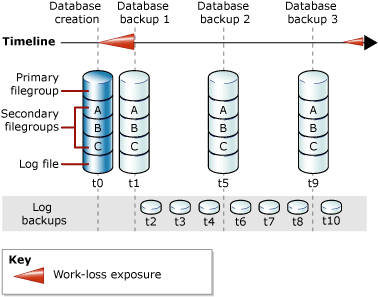
- Point-in-time recovery
- Take regular transaction-log backups
- Restore full → differential → logs
- Recover to a specific second
- The cost: you must manage log backups
Database Backups 101
Backup Type - Copy Only
- Copy Only is essentially a Full backup, but...
- No LSN - doesn't start a backup chain
- No transaction continuity
- It does NOT break LSN
- Decide: how many files? compression? location - network / local / fast disk?
Database Backups 101
Backup Type - Full
- Creation point for LSN
- Required for point-in-time
- Required for transaction logs
- Baseline for differentials and transaction logs
- How many files?
- Decide: how many files? location - network / local / fast disk / Blob / S3?
Database Backups 101
Backup Type - Transaction Logs
- Required for Full and Bulk Logged Recovery Models
- Don't forget - The log file will expand - potentially filling up your log drive
- Decide on your interval - more transactions, backup frequently, set schedule
- Monitor transactions and file size - increase/decrease
- Decide Location - Fast Disk
Database Backups 101
VLFs
Manage your VLFs (log fragmentation)
- The log is split into Virtual Log Files. One big growth = 8 to 16 VLFs; many tiny autogrowths pile up hundreds or thousands
- Too many VLFs slows log backups, restores, and crash/startup recovery - SQL enumerates every VLF before recovery begins
- Usual cause: small % or small fixed autogrowth on a busy log
- Check the count:
sys.dm_db_log_info(2016 SP2+/2017+) orDBCC LOGINFO
- Fix: log backup →
DBCC SHRINKFILE→ regrow once viaALTER DATABASE … MODIFY FILE (SIZE = …); set autogrowth to a fixed chunk (e.g. 512 MB to 1 GB)
Database Backups 101
VLFs
Pedro Lopes's VLF script (TigerToolbox)
SELECT DB_NAME(d.database_id) AS [Database],
       COUNT(li.vlf_sequence_number) AS VLFs
FROM   sys.databases d
CROSS APPLY sys.dm_db_log_info(d.database_id) li
GROUP BY d.database_id
HAVING COUNT(li.vlf_sequence_number) >= 50
ORDER BY VLFs DESC;
Full script outputs Actual vs Potential VLFs and the exact SHRINKFILE + MODIFY FILE commands
https://github.com/microsoft/tigertoolbox/blob/master/Fixing-VLFs/Fix_VLFs.sql
Database Backups 101
Backup Retention
- Short-term (disk): keep enough to meet your RPO/RTO. Ola
@CleanupTime, e.g. 7 to 14 days
- Long-term = GFS: daily diffs ~7 days → weekly fulls ~4 to 5 weeks → monthly fulls 6 to 12 months → yearly fulls for compliance (e.g. 7 years)
- Cheap archive tiers: Azure Archive / Amazon S3 Glacier for the old stuff
- Keep one copy immutable / WORM - ransomware can't delete what it can't touch
- Cleaning MSDB history ≠ deleting the files - manage both, and re-test that old backups still restore
Retention & long-term backups
Database Backups 101
RPO vs RTO - don't mix them up
- RPO - Recovery Point Objective: how much data can you lose? Sets your log-backup interval.
- RTO - Recovery Time Objective: how much downtime can you afford? Drives file count, disk speed & restore design.
- Both are measured in time.
- Smaller RPO = more frequent log backups. Smaller RTO = faster restores.
- Verify and document from the business what they are willing to lose and how long they can afford to be down.
RPO vs RTO
Database Backups 101
Software
- SQL Server Maintenance Plans - Not extremely customizable - Free
- RedGate - Customizable - UI - Job Based - Costs
- Idera SQL Safe - Wouldn't Install without domain - UI - Costs
- VM Snapshots - Not customizable - No point in time - All or nothing - entire server
- dbatools (PowerShell) - free;
Backup-DbaDatabase: full/diff/log, compression, encryption, striping, Azure blob, built-in verify
- Ola Hallengren - Completely customizable - Free
Backup software options
Database Backups 101
Cons
- SQL Server Maintenance Plans - Very Limited, Issues with upgrades, accounts
- RedGate - Customizable - UI can be heavy at times due to records kept in MSDB
- Idera SQL Safe - Wouldn't Install without a domain
- VM Snapshots - No point in time, freezes IO
- If you have multiple backup software, you will break LSNs
- Ola Hallengren/dbatools - Completely customizable, can backup in other formats
…and their gotchas
Database Backups 101
Full Sample
USE [DBA];
GO
EXEC [dbo].[DatabaseBackup]
@Databases = 'ALL_DATABASES',
@Directory = 'C:\Files\DatabaseBackups',
@BackupType = 'FULL',
@Verify = 'Y',
@CheckSum = 'Y',
@CleanupMode = 'AFTER_BACKUP',
@Compress = 'Y',
@CopyOnly = 'N',
@ChangeBackupType = 'Y',
@BackupSoftware = NULL,
@NumberOfFiles = 4,
@Description = 'Full Backup',
@DirectoryStructure = '{BackupType}{DirectorySeparator}{DatabaseName}{DirectorySeparator}',
@FileName = '{DatabaseName}_{BackupType}_{Year}{Month}{Day}_{Hour}{Minute}{Second}_{FileNumber}.{FileExtension}',
@CleanupTime = 336,
@LogToTable = 'Y';
Database Backups 101
Differential Sample
USE [DBA];
GO
EXEC [dbo].[DatabaseBackup]
@Databases = 'ALL_DATABASES',
@Directory = 'C:\Files\DatabaseBackups',
@BackupType = 'DIFF',
@Verify = 'Y',
@CheckSum = 'Y',
@CleanupMode = 'AFTER_BACKUP',
@Compress = 'Y',
@CopyOnly = 'N',
@ChangeBackupType = 'N',
@BackupSoftware = NULL,
@NumberOfFiles = 4,
@Description = 'Diff Backup',
@DirectoryStructure = '{BackupType}{DirectorySeparator}{DatabaseName}{DirectorySeparator}',
@FileName = '{DatabaseName}_{BackupType}_{Year}{Month}{Day}_{Hour}{Minute}{Second}_{FileNumber}.{FileExtension}',
@CleanupTime = 168,
@LogToTable = 'Y';
Database Backups 101
Transaction Sample
USE [DBA];
GO
EXEC [dbo].[DatabaseBackup]
@Databases = 'ALL_DATABASES',
@Directory = 'C:\Files\DatabaseBackups',
@BackupType = 'LOG',
@Verify = 'Y',
@CheckSum = 'Y',
@CleanupMode = 'AFTER_BACKUP',
@Compress = 'Y',
@BackupSoftware = NULL,
@NumberOfFiles = 1,
@Description = 'Tran Backup',
@DirectoryStructure = '{BackupType}{DirectorySeparator}{DatabaseName}{DirectorySeparator}',
@FileName = '{DatabaseName}_{BackupType}_{Year}{Month}{Day}_{Hour}{Minute}{Second}_{FileNumber}.{FileExtension}',
@CleanupTime = 7,
@LogToTable = 'Y';
Database Backups 101
- BUFFERCOUNT - number of I/O buffers; usually the biggest win (Ola
@BufferCount)
- MAXTRANSFERSIZE - largest write; default 1 MB, max 4 MB (Ola
@MaxTransferSize)
- BLOCKSIZE - 64 KB (65536) common for disk / URL (Ola
@BlockSize)
- Memory ≈ BUFFERCOUNT × MAXTRANSFERSIZE - too high starves the buffer pool. Tune, measure, repeat.
- Stripe to multiple files across paths to parallelize - often the easiest gain
Backup performance tuning
Performance
Database Backups 101
- Less data written = shorter backups (and faster restores) - costs CPU, watch busy servers
- TDE Compression - MAXTRANSFERSIZE > 65536 or you get almost nothing back.
Automatic since 2019 CU5
- SQL Server 2022: hardware offload via Intel QuickAssist (QAT) - ~2.3× faster
Limitations: Enterprise Edition: hardware or software QAT · Standard Edition: software only
- SQL Server 2025: NEW ZSTD Compression...!!
Backup performance tuning
Compression
Database Backups 101
- New: ZStandard (ZSTD) - open source, from Meta / Yann Collet
- Any edition, Windows or Linux, no special hardware
- Pick ALGORITHM + LEVEL: LOW (default), MEDIUM, HIGH
- MS claims 30 to 50% better than MS_XPRESS
ZSTD backup compression (SQL Server 2025)
BACKUP DATABASE [StackOverflow]
    TO
        DISK = N'C:\DatabaseBackups\2025\StackOverflow2025.Compression.Medium.bak'
    WITH
        NOFORMAT,
        NOINIT,
        NAME = N'StackOverflow-Full Database Backup',
        SKIP,
        NOREWIND,
        NOUNLOAD,
        COMPRESSION (ALGORITHM = MS_XPRESS, LEVEL = MEDIUM),
        STATS = 10,
        CHECKSUM;
GO
Compression
Database Backups 101
ZSTD vs MS_XPRESS - my own test
| Backup | Time | Size | Savings | Restore |
|---|---|---|---|---|
| No compression | 38:45 | 258 GB | n/a | 8:22 |
| MS_XPRESS · Low | 27:28 | 128 GB | 50.4% | 9:21 |
| MS_XPRESS · Medium | 25:13 | 121 GB | 53.1% | 7:00 |
| MS_XPRESS · High | 30:18 | 121 GB | 53.1% | 7:01 |
| ZSTD · Low | 16:15 | 129 GB | 50.0% | 5:22 |
| ZSTD · Medium | 28:28 | 106 GB | 58.9% | 6:26 |
| ZSTD · High | 1:06:00 | 100 GB | 61.2% | 6:30 |
444 GB Stack Overflow · 16-core i9, 64 GB RAM, NVMe · each run verified. Winner: ZSTD Low.
ZSTD Benchmark
Database Backups 101
Does striping to more files help?
| Files | Time | Backup Type | Compression | Level |
|---|---|---|---|---|
| 2 | 9:34 | Full | ZSTD | Low |
| 4 | 9:20 | Full | ZSTD | Low |
| 8 | 9:36 | Full | ZSTD | Low |
| 12 | 8:42 | Full | ZSTD | Low |
| 16 | 8:38 | Full | ZSTD | Low |
444 GB Stack Overflow · ZSTD Low on every run · 16-core i9, 64 GB RAM, NVMe. Winner: 16 files at 8:38.
File Count
Database Backups 101
ZSTD takeaways
- ZSTD Low won: 16:15 backup (vs 38:45 uncompressed) and the fastest restore (5:22)
- 50% smaller - same savings as MS_XPRESS, far faster
- Higher level ≠ better: ZSTD High took over an hour for only ~11% more savings
- Your data compresses differently - test the levels on your database
Database Backups 101
- Take a tail-log backup before you restore - it captures the last transactions after the disaster
- Restore full → differential → logs, each
WITH NORECOVERY; only the final step isWITH RECOVERY
- Use
STOPAT = '2025-11-16 14:32:00'to recover to an exact second
STANDBYleaves the DB readable between log restores
Restore 101
A backup is only as good as your last successful restore.
Restore
Database Backups 101
- VERIFY ≠ RESTORE:
RESTORE VERIFYONLYonly checks the media is readable - it does not prove the DB restores
- Automate test restores to a scratch server (dbatools
Restore-DbaDatabase/ Ola HallengrenDatabaseRestore)
- Encrypting backups? Back up the certificate / key or the backups are unrecoverable
- 3-2-1: 3 copies, 2 media, 1 offsite - plus 1 immutable / air-gapped. SQL 2022 backs up to S3-compatible URLs
Test restores & protect the keys
Test Restores
Database Backups 101
Always
- Always Checksum
- Always Verify
- If not using TDE, encrypt backups
- Use Compression
- Cleanup Old Backups
- Add indexes to MSDB Backup tables
Database Backups 101
Always
- Cleanup MSDB Backup Tables
- Alert on Failures
- Check and verify minimal VLFs by managing the Transaction Log size and auto growth
- Run CheckDB on the Production Database to check for issues
- Discuss and determine RPO/RTO and Retention with Business and Legal
- Test your backup by restoring the database
- https://learn.microsoft.com/en-us/sql/relational-databases/backup-restore/backup-overview-sql-server
- https://learn.microsoft.com/en-us/sql/t-sql/statements/backup-transact-sql
- https://www.jefftaylor.io/post/sql-server-2025-backups-new-zstd-compression
- https://www.jefftaylor.io/post/sql-server-2025-backup-compression-and-restore-review
- https://support.microsoft.com/en-US/servicing/SQL/backup-restore/kb4561915-improvement-maxtransfersize-no-longer-required-to-enable-backup-compression-on-tde-encrypt
- https://github.com/microsoft/tigertoolbox/tree/master/Fixing-VLFs
- https://ola.hallengren.com
- https://dbatools.io
Resources

Let's talk backups - and restores.
Questions
Thank you!
Jeff Taylor
Thank you for attending my session today.
If you have any additional questions, please don't hesitate to reach out.




The DBA's Guide to Not Getting Fired - Backups 101
By reviewmydb