Intro to Claude AI:
Your Efficiency Assistant
Setting Up Claude With Skills and MCP Servers
Jeff Taylor
Claude
A development community focused on the .NET stack
953 members, free to attend, always
https://meetup.com/jaxdug

Every 3rd Wednesday, 6-8pm
Except for May, November and December
https://jaxdata.org

Multiple Workshops on Friday
Saturday a Full day of sessions, no cost to attend
Run under Jax Data, our 501(c)(3)
https://dayofdata.org/jax

Sponsor
Tonight's sponsor

Jeff Taylor
Principal Data Consultant
Database Consulting, LLC






Super Hero Suit

Poll
What is your role?
- .NET developer
- Other stack
- DBA or data engineer
- Something else entirely
Poll
Who's already using AI?
- Every day
- Tried it, gave up
- Never touched it
- Not allowed to at work
Intro to Claude AI:
Your Efficiency Assistant
Setting Up Claude With Skills and MCP Servers
Jeff Taylor
Claude
The Usual Workflow
How most of us use it
- Open a tab
- Paste a question
- Copy the answer out
- Fix what it got wrong
Tomorrow you start over.
It remembers nothing.
It remembers nothing.
What It Doesn't Know
About you
- Your voice - how you actually write
- Your standards - naming, structure, conventions
- Your tools - your database, your notes, your files
- Your history - what you decided last week and why
The Fix
Three layers
- Setup - point it at your work
- Skills - write your standards down once
- MCP - plug it into your actual tools
Agenda
- Setup
- Skills
- MCP servers
- Build something live
- Gotchas
Setup
Where does it run?
- Browser - claude.ai
- Terminal - Claude Code
- Desktop app - Cowork
Setup
Which one do I use?
| Surface | Good for | What I use it for |
|---|---|---|
| Browser | Asking things | Quick questions, research |
| Terminal | Files and code | Scripts, decks, client work |
Setup
Install
npm install -g @anthropic-ai/claude-code

cd C:\ClaudeCo-Work
claudeDEMO TIME
Install, then point it at a folder.
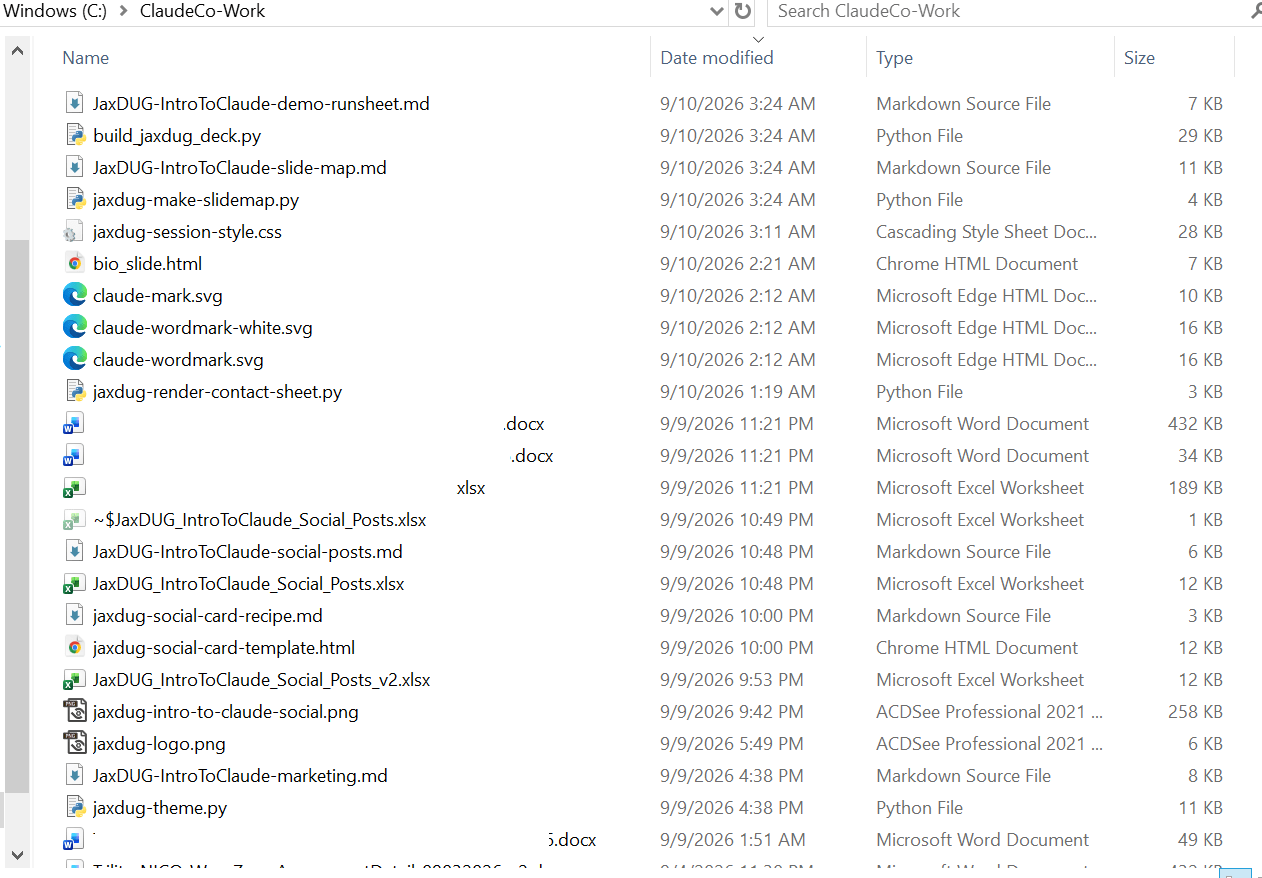
One Folder
Where the work lives
CLAUDE.md
What it points at
# Jeff Taylor's working folder

Read these before doing anything on Jeff's behalf. They already exist. Never ask Jeff to re-explain his style or preferences, and never say you can't reach them.

- writing-style.md        voice and habits for anything written as Jeff. No em-dashes. Ever.
- presentation-style.md   slide decks and presentations.
- claude-preferences.md file saving, platform limits.CLAUDE.md
Standing rules
## Standing rules

- Save all final deliverables directly to C:\ClaudeCo-Work. The temp outputs path is too long for Jeff to open files from, so a file that only lands there is not delivered.

- If a target file is locked (open in Excel or Word, a ~$ lock file present), save a _v2 copy rather than failing.

- Jeff is premium on LinkedIn (3,000 chars) and X (25,000). Do not cap X posts at 280.It's a text file.
That's the whole trick.
That's the whole trick.
Skills
What is it?
A folder with a SKILL.md that says how you do a thing.
Skills
Why bother?
- You explain it once
- It applies every time
- It syncs across every session
- You can back it up and share it
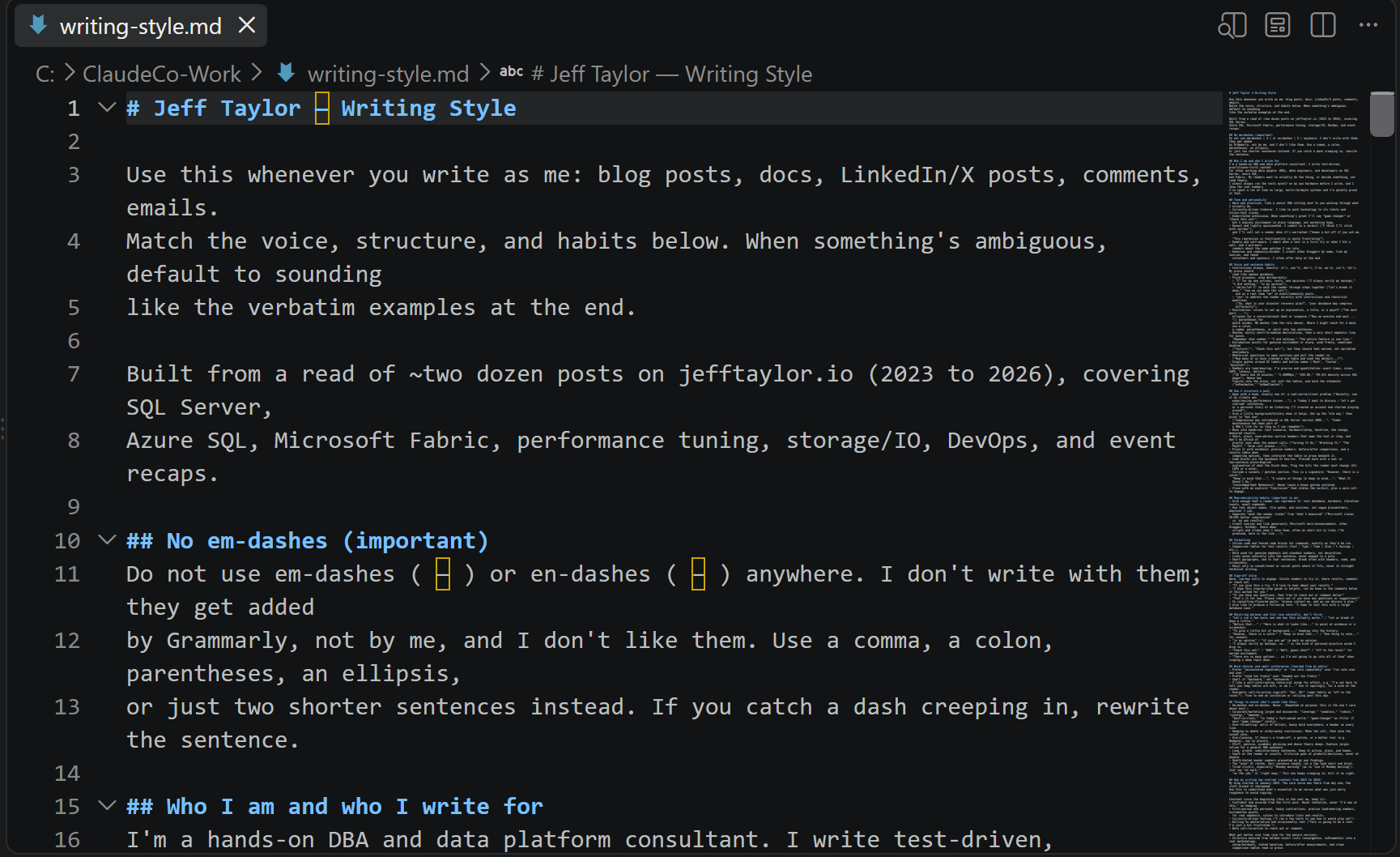
writing-style.md
My voice, written down
16KB. Built from reading two dozen of my own blog posts.
presentation-style.md
How I build a deck
- The cold open sequence
- Fragment reveals, not transitions
- Style at the theme level, one place to change it
- The evaluation close
This deck
was built by the file.
was built by the file.
My Own Skills
Nobody shipped these, I wrote them
- presentation-theming - turn a brand into a slide theme
- slides-com-deck-authoring - how my decks get built
- web-development - how I want web code written
- mobile-development - my MAUI conventions
- writing-style.md and presentation-style.md - still just files
Skills I Didn't Write
Most of them, honestly
- Some ship with it: Word, Excel, PowerPoint, PDF
- Some arrive as plugins, a whole bundle at a time
- Slack, Canva, Zapier, Wix, Auth0, Postman
- Role packs too: engineering, data, operations
- I wrote four. I use a lot more than four.
Skills vs Files
Why the difference bites
- A skill announces itself. It loads when the work matches.
- A file sits there. Something has to go read it.
- Both work. Only one is automatic.
- If you keep repeating yourself, promote the file to a skill.
Re-skinning
One block per venue
--hashtag:  "#JaxDUG";
--brand:    #083552;
--brand-2:  #1A75BB;
--font: Montserrat;DEMO TIME
Write a blog post intro, in my voice.
Skills
How do I make one?
- Write the markdown yourself, or
- Ask it to build the skill with you
- Drop it in your skills folder
- It's there in every session from then on
- Once you work through something, ask Claude to build and add a skill for what you just finished
Memory
It stopped starting over
- It keeps notes on how I work, across every session
- I corrected it once on how I fragment a slide
- I have not had to say it a second time
- The rules live with me, not with the tab
Tell it once.
That's the whole job.
That's the whole job.
MCP
What is it?
A standard way to plug a tool into the assistant.
MCP
Old way vs new way
- Old - copy data out, paste it in, copy the answer back
- New - it reads the source itself
MCP
What I have connected
- SQL Server
- Granola (my meeting notes)
- slides.com (this deck)
- Slack
- Bitly
- Postman
SQL Server MCP
What it can do
- List databases
- Read a table schema
- List stored procedures
- Run a query
- Read a proc definition
DEMO TIME
Ask a live SQL Server a question in English.
SQL Server MCP
However, there is a catch:
- It runs as whoever you connected as
- Use a read only account for demos and exploring
- It will happily run what you ask it to run
- Never point it at production on a whim
Granola MCP
My meeting notes
"What did I commit to on that call?"
DEMO TIME
Pull commitments out of last week's meetings.
MCP
Setting one up
{
  "mcpServers": {
    "mssql": {
      "command": "npx",
      "args": ["-y", "@modelcontextprotocol/server-mssql"],
      "env": { "MSSQL_CONNECTION_STRING": "CHANGE THIS" }
    }
  }
}Trust, But Verify
A real one from this deck
- The slides.com server takes a CSS field, and returns success
- It never stores it. The field comes back empty every time
- Nothing errored. It just quietly did not happen
- So it drove my browser instead and clicked save itself
MCP
Keep in mind that...
- Every server you add costs context
- Turn off what you aren't using
- Check what a server can actually do before you trust it
- Read the permissions
Put It All Together
A real problem I had
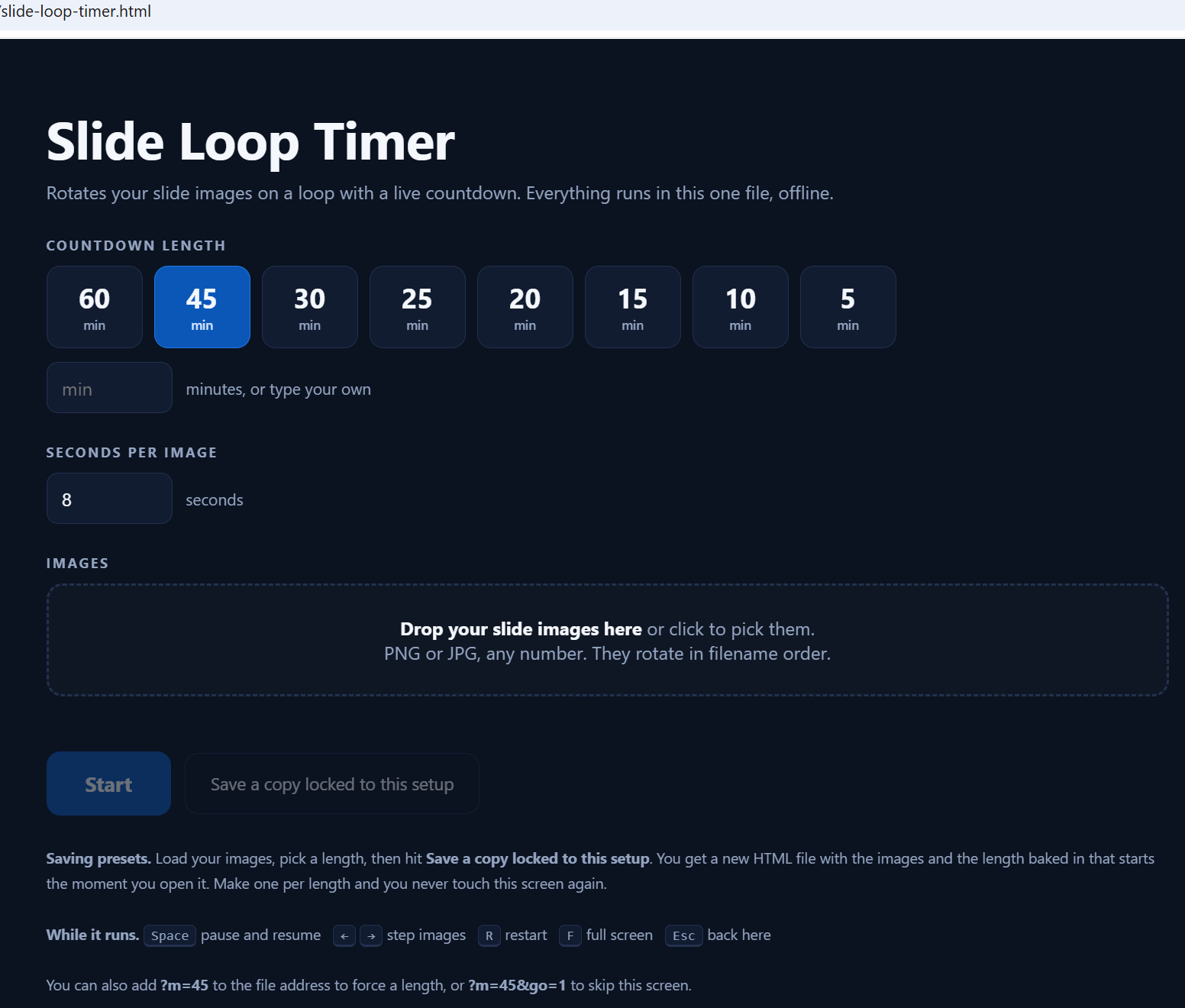
"I need a countdown timer on the screen before my session starts."
The Constraint
PowerPoint can't count down
- Option one: a VBA macro, blocked on a lot of machines
- Option two: 452 slides, one per tick of the clock
- It built both and didn't like either.
DEMO TIME
Build the timer page from scratch, live.
This Deck
One prompt, start to finish
- Built the slides from my presentation rules
- Skinned them in the JaxDUG palette, pulled from the logo
- Pushed them to slides.com over MCP
- Rendered every slide and checked its own work
- Fixed what the render caught, before I ever saw it
What Came Out
Real output
Before and After
Does this make a difference?
| Task | Before | After |
|---|---|---|
| Blog post draft | 2 hours | 20 minutes |
| Deck re-skin for a venue | An evening | One block |
Recap
- Point it at a folder
- Write your rules down
- Plug in one tool
- Check its work
- Start small
Resources
https://docs.claude.com
https://modelcontextprotocol.io
https://jefftaylor.io/blog
Tonight's slides and files: https://bit.ly/IntroToClaudeAI
Questions?
Thank you!
Jeff Taylor
Thank you for attending my session today.
If you have any additional questions, please don't hesitate to reach out.




Intro to Claude AI: Your Efficiency Assistant
By reviewmydb
Intro to Claude AI: Your Efficiency Assistant
Setting Up Claude With Skills and MCP Servers. JaxDUG session, 60 to 90 minutes. Jeff Taylor, @ReviewMyDB.