Rafael Pereira Alonso
Computer Science student at the Federal University of São Carlos - Sorocaba and Ruby On Rails Teacher
Important stuff to know before doing an interview
If you get this wrong, you goin' home
Sometimes we need to list some models with information about one or more associations. For instance, if we want to show a list of reviews and who wrote them, we could do something like:
reviews = Review.all

reviews.each do |review|
  puts review.text
  puts review.user.name
end
What's the problem here?
When we do review.user, we tell the code to go fetch the review's user in the DB, since we didn't load it previously (aka we didn't eager load it)
review = Review.all
# => SELECT * FROM comments;

reviews.each do |review|
  puts review.text
  puts review.user.name
  # => SELECT * FROM users WHERE id = comment.user_id
end
That means the code will hit the DB for every review we have. This is what we know as the N+1 queries problem (1 query to fetch reviews + N queries to fetch users).
If we use includes when loading the reviews though, we tell the code to also retrieve every user that might be associated to the reviews retrieved!
reviews = Review.all.includes(:user)

reviews.each do |review|
  puts review.text
  puts review.user.name # users were eager loaded
end
And just like that, we replaced N+1 queries with 2 (1 query to fetch the reviews + 1 query to fetch the users)
What if we want to retrieve reviews from active users and only display the review information? How would we do it?
reviews = ?

reviews.each do |review|
  puts review.text
  puts review.created_at
endJoins look like a nice solution (since it's in the slide title hehe)
reviews = Review.joins(:user).where(users: { active: true })

reviews.each do |review|
  puts review.text
  puts review.created_at
end
Can we use includes in this case, though? If yes, why not use it instead? If no, then why not?
Conclusion: joins are only better if you don't need to load the associations into the memory and/or need to do more complex join queries. Otherwise, includes should be enough
Why have many tables when few tables do work?
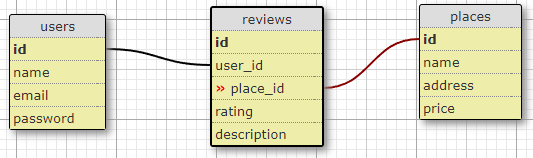
Let's say we have an Airbnb clone a platform to help people find places to stay. We could design the DB to allow the users to review places like this:
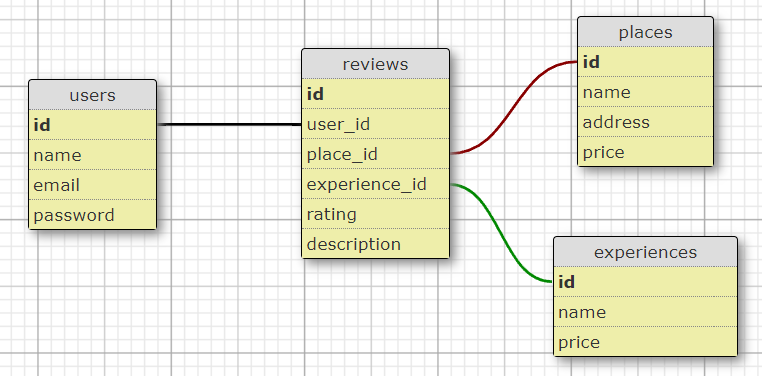
Since we're copying Airbnb growing and attending users' requests, we'll now have Experiences for users to book and review. But how would we design the DB to allow experiences to be reviewed? Maybe another foreign_key?
What's wrong with this approach?
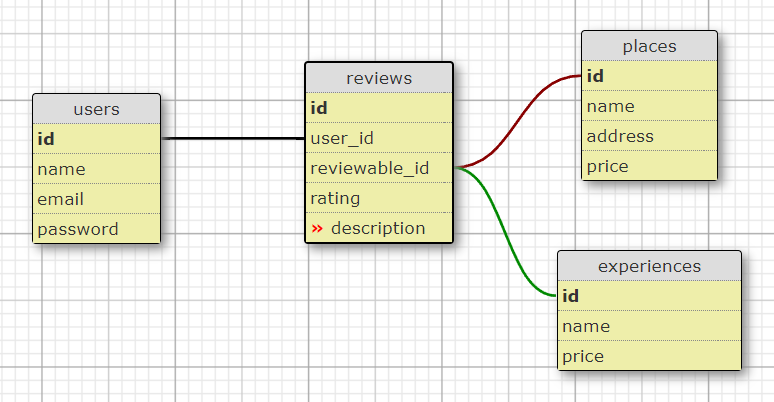
Since a review can only be applied to a place OR to an experience, having two foreign keys would mean one of them would always be empty. Would be best to have a single foreign key that could refer to either one or the other instead.
Something is still missing here though...
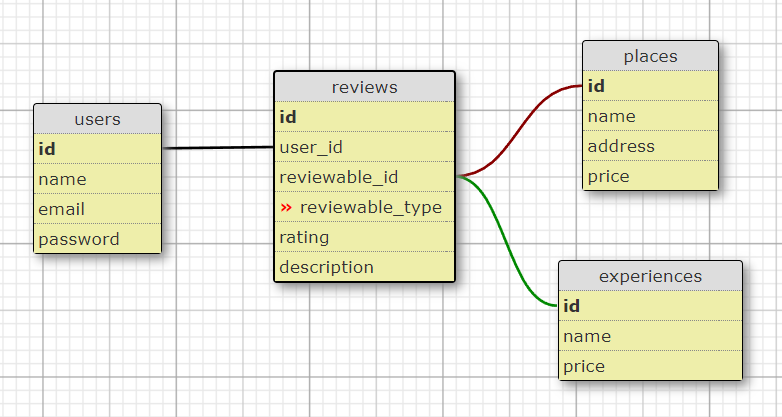
If we only store the id, we won't know if such id will belong to a place or to an experience. To avoid that, we also need a field to explicitly say which one of those the id is referring to.
And that, ladies & gentlemen, is polymorphism.
Since we're talking about DB, nothing better than start with a migration:
# when creating the table
class CreateReviews < ActiveRecord::Migration[5.1]
  def change
    create_table :reviews do |t|
      t.integer :rating
      t.string :description
      t.references :user
      t.references :reviewable, polymorphic: true # This is all you need
      t.timestamps
    end
  end
end

# if the table already exists
class MakeReviewableToReviews < ActiveRecord::Migration[5.1]
  def change
    add_reference :reviews, :reviewable, polymorphic: true
  end
end
In the Review model, you need to specify that the association is polymorphic:
class Review < ApplicationRecord
  belongs_to :user
  belongs_to :reviewable, polymorphic: true
end
In the Reviewable models (e.g. Place and Experience), this is what you want:
class Experience < ApplicationRecord
  has_many :reviews, as: :reviewable, dependent: :destroy
end

class Place < ApplicationRecord
  has_many :reviews, as: :reviewable
endWith everything setup, have fun!
user = User.find(1)
place = Place.find(1)
experience = Experience.find(1)

review1 = Review.create(user: user, reviewable: place, rating: 2)
review2 = Review.create(user: user, reviewable: experience, rating: 5)

review1.reviewable_id # => 1
review2.reviewable_id # => 1

review1.reviewable_type # => 'Place'
review2.reviewable_type # => 'Experience'

review1.reviwable # => <Review @id=1 ...>
review2.reviwable # => <Experience @id=1 ...>

place.reviews		# => [...]
experience.reviews # => [...]Impress your interviewer by having deep knowledge in something actually pretty simple
Let's say you have a library (not an application, an actual library). People come in to donate books, and when they do you just find the first open space in the nearest shelf and store it. People also come to read, coming to you with the book name so you can go find it and bring it to the client.
If someone comes looking for "Hitchhiker's Guide to The Galaxy" on your library, how much time will you take for you to find it?
How much time would you spend to sort your entire library?
What if you had stored your books in alphabetical order?
The best solution is to create a list with the books' names in alphabetical order and the location they're stored in your library, without minding where you actually put them. For instance:
Hitchhiker's Guide to The Galaxy - A03/S02/B10
That code could give you the Bookcase (A) 03, Shelf (S) 02 and book number (B) 10. As long as you keep your list organized and up-to-date (way easier than to keep the entire library organized), you'll be able to easily find whatever you're looking for.
In DBs, this list is called and index.
When creating an index, we need to decide which attribute (or attributes) we're going to use to build our ordered list. We can use any field we'd like, but some are better than others. For instance, what would be better to use (and why)?
Golden Rule: the more unique values it has, the better
After deciding what field(s) to use, all we need is to build the index in our DB with the following syntax
class AddIndexToBooks < ActiveRecord::Migration[5.1]
  def change
    # add_index :table, :field
    add_index :books, :title

    # OR

    # add_index :table, [:field1, :field2, ...]
    add_index :books, [:title, :author]
  end
end
And just like that, your Book queries using the indexed fields will run faster!
B-Tree:
The default index, most of the times. Good on most cases, stores the indexed values in a Binary Tree (for binary search)
Hash:
Good for when you need exact matches and have mostly unique values. Works like a Ruby Hash, where the key is the indexed value and the value is where the record is stored
Gin:
A more complex structure best-suited for when you have multiple values in a single column (e.g. arrays, jsonbs, ranges)
By Rafael Pereira Alonso