

Next.js - advanced (part 1)
Next.js - advanced (part 1)
ORM

Prisma
Working with Prisma gives you a best-in-class TypeScript ORM, a declarative database migration system, and a database with everything you need to get started

Prisma
- Why?
- Modern ORM
- Full TypeScript support
- Excellent developer experience (DX)
- Performance is not a concern
- Splendid documentation
SQLite
SQLite is a C-language library that implements a small, fast, self-contained, high-reliability, full-featured, SQL database engine. SQLite is the most used database engine in the world.

SQLite
- Why?
- Already worked with it in PGM3 ✅
- PostgreSQL in PGM4 was no success 😔
- Good enough for small apps
- Database details are not the focus of this course
- Easier to include data into version control
Next.js + Prisma + SQLite
- How?
- Create a new Next.js project
- Install Prisma
- Initialize Prisma with SQLite
npx create-next-app@15.5.2
npm install prisma --save-dev
npx prisma init --datasource-provider sqlite --output ../src/app/_generated/prisma
Next.js + Prisma + SQLite
- What just happened? 🤯
-
prisma.schema (added)
- Main configuration file for Prisma
-
.env (added)
- Defines location of our database file
-
.gitignore (modified)
- Ignore code that Prisma generates 👍
-
prisma.schema (added)
Next.js + Prisma + SQLite
- Example schema from official Prisma documentation
- User
- Post
- Run the initial migration to create the database tables
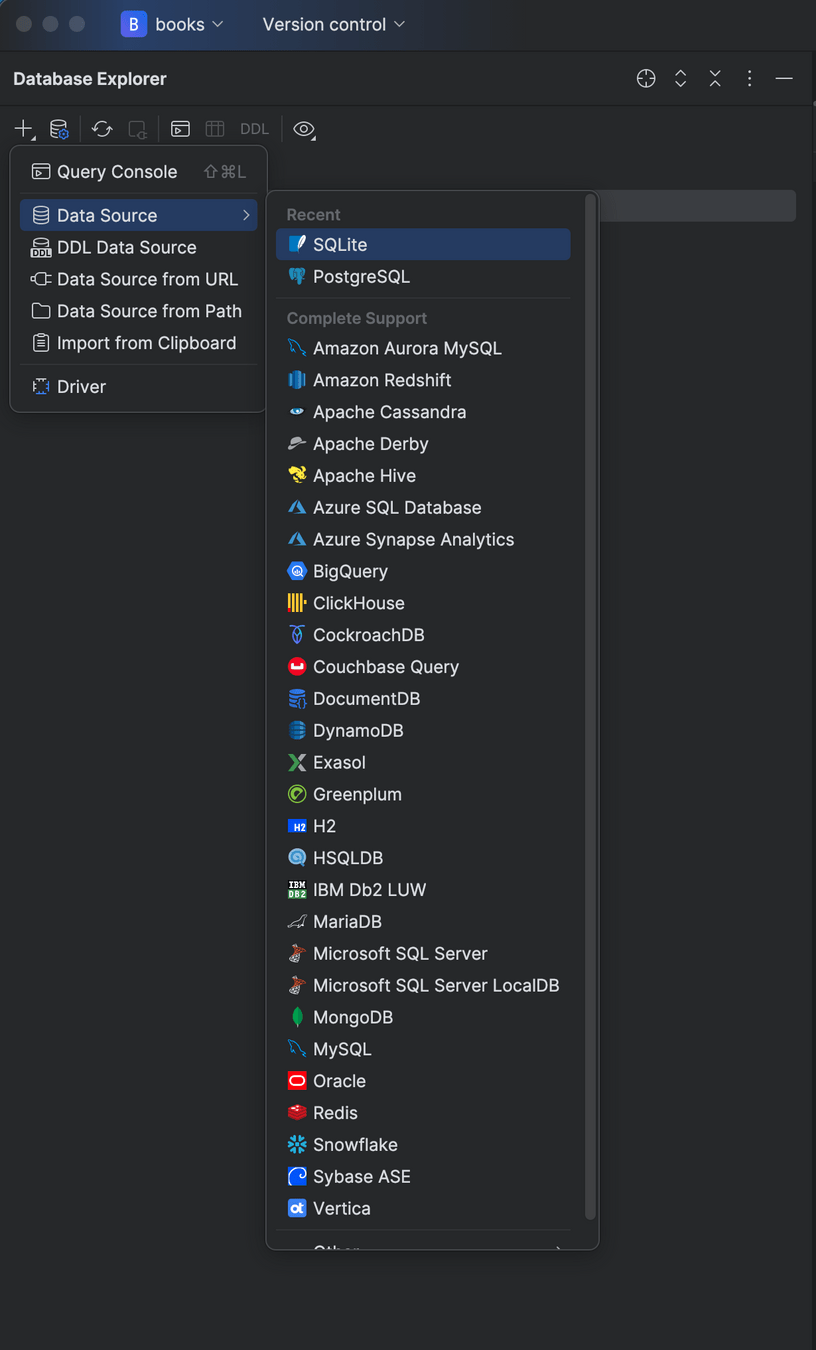
- Verify in Datagrip (or another tool)
npx prisma migrate dev --name initDatagrip
- Check out the Teams message
- Create new project
e.g. "pgm5-eindopdracht" - + → Data source→ SQLite
- Select the database file
- Create new project
Prisma Client
- Set up Prisma Client
- Create new folder + file:
src/lib/client.ts
- Create new folder + file:
import { PrismaClient } from "@/app/_generated/prisma";

const globalForPrisma = global as unknown as {
  prisma: PrismaClient;
};

const prisma = globalForPrisma.prisma || new PrismaClient();

if (process.env.NODE_ENV !== "production") globalForPrisma.prisma = prisma;

export default prisma;
Prisma Client
- ⚠️ When working with Prisma:
- Adjust schema.prisma
- Create a new migration (or use prototyping)
- Generate a new client
- Got lost? Reset!
Prisma Client
When you want to interact with the database,
import the prisma object and go!
import prisma from "@/lib/client";

export default async function Books() {
  const books = await prisma.book.findMany();
  return (
    <div>
      <ul>
        {books.map((book) => {
          return <li key={book.id}>{book.title}</li>;
        })}
      </ul>
    </div>
  );
}
Next.js, Prisma & SQLite
Got lost somewhere in this set-up process?
Make sure to check out the recording!
Next.js - advanced (part 1)
Prisma schema: basics
Model
- Keyword: model
- Must be uniquely identifiable
-
Model name:
- Must start with a letter
- Typically spelled in PascalCase
- Should use the singular form
- Can not use reserved words
Model fields
- Fields are properties of models
-
Naming conventions:
- Must start with a letter
- Typically spelled in lowerCamelCase
-
Each field should have a type
-
Prisma maps this to:
- SQLite datatype
- JavaScript datatype
-
Prisma maps this to:
-
Naming conventions:
Field types
| Field type (Prisma) | JavaScript type | SQLite type |
|---|---|---|
| String | string | TEXT |
| Boolean | boolean | INTEGER |
| Int | number | INTEGER |
| BigInt | BigInt | INTEGER |
| Float | number | REAL |
| Decimal | decimal.js | DECIMAL |
| DateTime | Date | NUMERIC |
Field types
-
Float, BigInt or Decimal?
- Use Decimal if you need precision (e.g. calculations)!
- Use BigInt if larger than Number.MAX_SAFE_INTEGER
const a = 0.1 + 0.2;
// what is the value of a?
Modifiers
-
?
- Optional field
-
[ ]
- List
- Not supported in SQLite
Attributes
@id
- Usually annotated with @default
- autoincrement()
- uuid()
- cuid()
- ...
SQLite caveats
- ⚠️ SQLite is flexibly typed
- ⚠️ SQLite doesn't handle datetime well
- Solution: insert as Unix epoch time in milliseconds
- Disadvantage: not human-readable
Oefening
-
Oefening (deel 1)
- Initialiseer Next.js en Prisma in een nieuw project
- Maak een Task model
- title (unique)
- priority (high, medium, low)
- default: medium
- deadline
- isCompleted
Oefening
-
Oefening (deel 1)
- Maak in Datagrip 5 taken aan
- Next.js route: /tasks
- Toon alle taken in een lijst
- Afgewerkte taken geef je doorstreept weer
Next.js - advanced (part 1)
Radix Themes
Component libraries
A Component Library is an organized collection of pre-designed and pre-built user interface (UI) elements that can be reused across various projects. These elements often include items like buttons, fonts, accordions, or even larger segments such as headers or footers. The primary aim of a component library is to standardize development, minimize code duplication, and drive scalability within digital products.
- Sanity.io
Component libraries
Examples:
→ feel free to use one or none for your assignment.
We'll use Radix Themes for in-class examples/exercises.
Component libraries
Oefening (deel 2):
- branch: oefening-deel-2
- Installeer Radix Themes
- Gebruik een aantal componenten uit Radix Themes om je applicatie en lijst van taken vorm te geven
Next.js - advanced (part 1)
Working with forms
Forms
Oefening (deel 3):
- branch: oefening-deel-3 (git fetch --all)
- Nieuwe route:
/tasks/new- Formulier om nieuwe taak te maken
- ⚠️ Gebruik componenten uit Radix Themes
- Het formulier hoeft nog niet functioneel te zijn,
voorzie gewoon al de nodige velden/componenten
Forms - React Server Actions
Forms - Optie 1: React Server Actions
- Works in both server and client components
- ⚠️ In client components: not inline
- Pass a function to action attribute of <form>
- Argument of type FormData
- ⚠️ Use the name attribute on form elements
React Server
export default function NewItemPage() {
  async function createItem(formData: FormData) {
    "use server";

    const rawFormData = {
      /* formData.get() returns een value met type File | string | null.
         Daarom moeten we de TS compiler helpen met casting of narrowing */
      description: formData.get("description") as string ?? ""
    }

    // do something here e.g. create an item in the database
  }

  return (
    <form action={createItem}>
      <input type="text" name="description" />
      <button type="submit">Submit</button>
    </form>
  );
}
Forms
Oefening (deel 4):
- Branch: oefening-deel-4 (git fetch --all)
- .env → DATABASE_URL="file:./dev.db"
- npm install
- npx prisma migrate dev
- Maak het formulier functioneel m.b.v. server actions
Programmatic navigation
- Navigation is usually initiated by a user
clicking on a Link-component. - However, we can also initiate navigation programmatically (meaning: in our code),
hence programmatic navigation- Client components: useRouter hook
- Server actions: redirect
Programmatic navigation
// This is an example of programmatic navigation in a client component
"use client";

import { useRouter } from "next/router";

export function Page() {
  const router = useRouter();

  function onClick() {
    console.log("Do something else here instead of logging ... !");
    router.push("/about");
  }

  return (
    <div>
      <button onClick={onClick}>Go to about page</button>
    </div>
  );
}
Programmatic navigation
// This is an example of programmatic navigation in a server component
export default function NewItemPage() {
  async function createItem(formData: FormData) {
    "use server";

    // do something here e.g. create an item in the database

    redirect("/items");
  }

  return (
    <form action={createItem}>
      <input type="text" name="description" />
      <button type="submit">Submit</button>
    </form>
  );
}
Forms
Oefening (deel 5):
- Branch: oefening-deel-5 (git fetch --all)
- .env → DATABASE_URL="file:./dev.db"
- npm install
- npx prisma migrate dev
- Na het toevoegen van een nieuwe taak,
redirect naar /tasks
Forms
Forms - Optie 2:
- React's onSubmit handler → POST request
- ⚠️ Only in client components
- API route to process the request body
API routes
How can we create an API endpoint in Next.js?
-
New folder + file: /app/api/user/route.ts
- ⚠️ Naming convention
import prisma from "@/lib/client.ts";

export async function POST(request: Request) {
  // do something here ...
}
API routes
Side quest (lees: huiswerk):
- Herschrijf de formulier-implementatie:
maak gebruik van onSubmit handler
Next.js - advanced (part 1)
Seeding the database
Seeding
Seeding: consistently recreating the same data
- Manual trigger:
- npx prisma db seed
- Triggered automatically:
- npx prisma migrate reset
- Interactive reset (e.g. schema conflict)
- Initial migration (npx prisma migrate dev)
Seeding
// File: prisma/seed.ts
// Important: do NOT use the import alias (@) but use a relative path
import { PrismaClient } from "../src/app/_generated/prisma";

const prisma = new PrismaClient();
async function main() {
  await prisma.task.deleteMany();
  const tasks = await prisma.task.createMany({
    data: [ ... ],
  });
  console.log(tasks);
}
main()
  .then(async () => {
    await prisma.$disconnect();
  })
  .catch(async (e) => {
    console.error(e);
    await prisma.$disconnect();
    process.exit(1);
  });
Seeding
// File: package.json
{
  ...,
  "devDependencies": {
    ...
  },
  "prisma": {
  	"seed": "ts-node --compiler-options {\"module\":\"CommonJS\"} prisma/seed.ts"
  },
}
npm install -g ts-nodeSeeding
npx prisma db seed

...

Running seed command `ts-node --compiler-options {"module":"CommonJS"} ...
{ count: 5 }

🌱  The seed command has been executed.
Seeding
Oefening (deel 6):
- Branch: oefening-deel-6 (git fetch --all)
- .env → DATABASE_URL="file:./dev.db"
- npm install
- npx prisma migrate dev
- Verwijder alle bestaande taken uit je database
- Maak een seed script en seed je database opnieuw
Next.js - advanced (part 1)
Relations
Relations
Recap:
- one-to-one (1:1)
- one-to-many (1:n)
- many-to-many (n:n)
Relations
In Prisma, we need to:
- Define relations in our schema
- Retrieve related data manually
- ⚠️ Pay attention when inserting data
Relations
One-to-many relations
model User {
  id    Int    @id @default(autoincrement())
  posts Post[]
}

model Post {
  id       Int  @id @default(autoincrement())
  author   User @relation(fields: [authorId], references: [id])
  authorId Int
}

// The fields author and posts do not exist in the database
One-to-many relations
// Example of how to create nested records:
// https://www.prisma.io/docs/orm/prisma-schema/data-model/relations#create-a-record-and-nested-records
const userAndPosts = await prisma.user.create({
  data: {
    posts: {
      create: [
		// Populates authorId with user's id
        { title: 'Prisma Day 2020' },
		// Populates authorId with user's id
        { title: 'How to write a Prisma schema' },
      ],
    },
  },
});
One-to-many relations
- ⚠️ We can't access relations in a createMany()
- Seed script: use create instead of createMany
- ⚠️ We can't delete records from the "one" entity,
that still refer to records from the "many" entity- Seed script: delete all records from the
"many" entity first
- Seed script: delete all records from the
One-to-many relations
Oefening (deel 7):
- Branch: oefening-deel-7 (git fetch --all)
- .env → DATABASE_URL="file:./dev.db"
- npm install
- npx prisma migrate dev
One-to-many relations
Oefening (deel 7):
- Branch: oefening-deel-7 (git fetch --all)
- .env → DATABASE_URL="file:./dev.db"
- npm install
- npx prisma migrate dev
One-to-many relations
Oefening (deel 7):
-
Voeg een nieuw model Comment (n:1 Task) toe
- 3 database-velden: id, description, taskId
-
Migreer de database
- npx prisma migrate dev --name add_comment_model
- Pas het seed script aan (5 tasks, 10 comments)
- Verwijder alle data, seed opnieuw
(npx prisma db seed)
Relations
To include related data in our queries:
const users = await prisma.user.findMany({
  include: {
    posts: true,
  },
});
Relations
Oefening (deel 8):
- Branch: oefening-deel-8 (git fetch --all)
- .env → DATABASE_URL="file:./dev.db"
- npm install
- npx prisma migrate dev
Relations
Oefening (deel 8):
- Route /tasks: haal ook alle comments op
- Toon comments onder de taakbeschrijving
→ Huiswerk!
PGM5/3 - Next.js: advanced (part 1)
By kareldesmet