















Content ITV PRO
This is Itvedant Content department
Learning Outcome(Slide2)
6
Basics of branding and messaging
5
Target audience and segmentation
4
Different marketing channels
3
Creating value for customers
2
Understanding customer needs
1
What marketing means ?
Choose cool, soft colors instead of vibrant colors
Max 6 Points for Summary & Min 4
Topic Name-Recall(Slide3)
Hook/Story/Analogy(Slide 4)
Transition from Analogy to Technical Concept(Slide 5)
Relationship Mapping in Spring Boot (using JPA/Hibernate) defines how entities (Java classes) are connected to each other in the database.
Represents real-world data relationships clearly
Avoids data duplication in database tables
Enables easy data retrieval using object references
Maintains data consistency and integrity automatically
Example
Teacher teaches Student
"teaches" is the relationship between entities
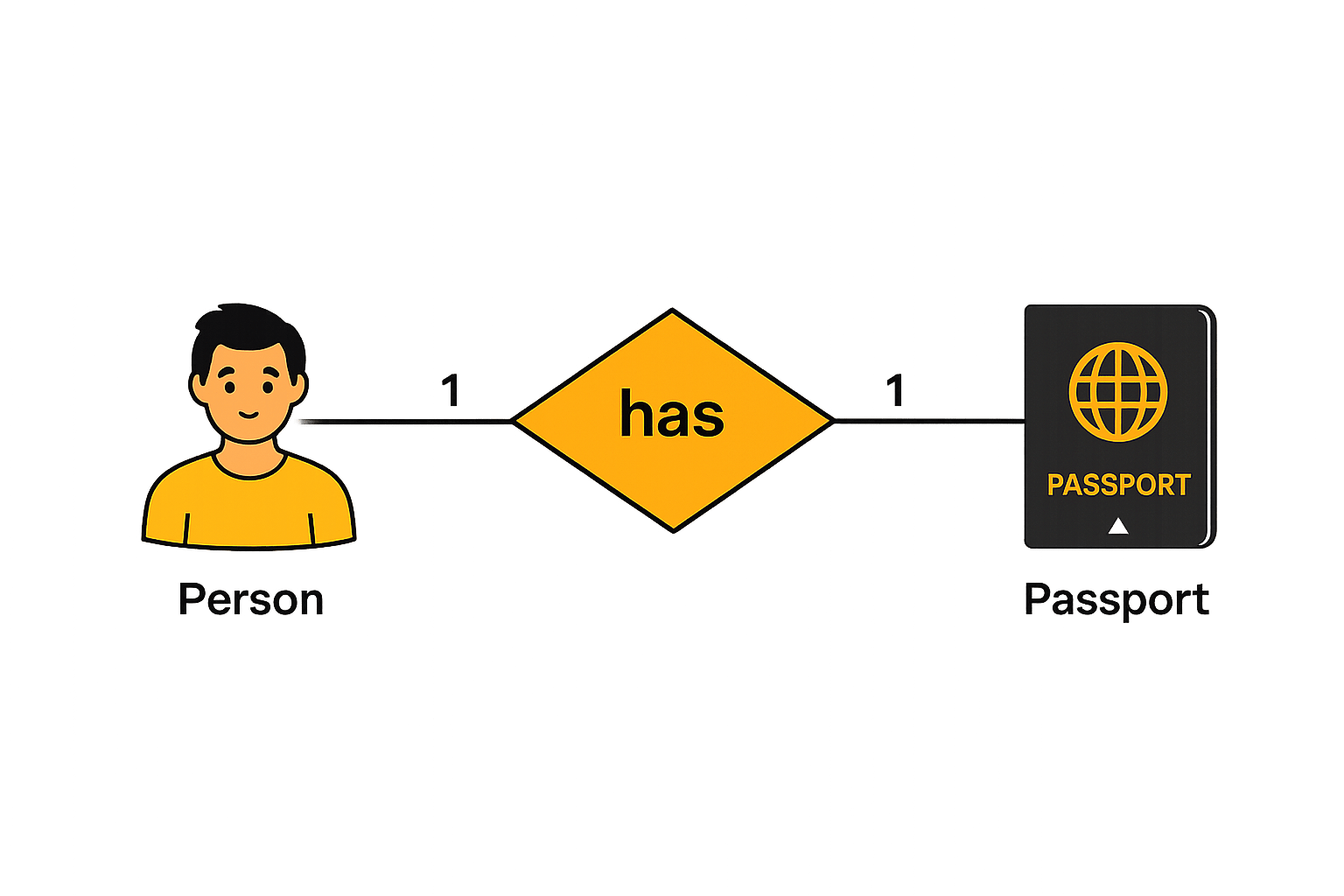
Such a relationship exists when each record of one table is related to only one record of the other table.
For example, If there are two entities ‘Person’ (Id, Name, Age, Address)and ‘Passport’(Passport_id, Passport_no). So, each person can have only one passport and each passport belongs to only one person.
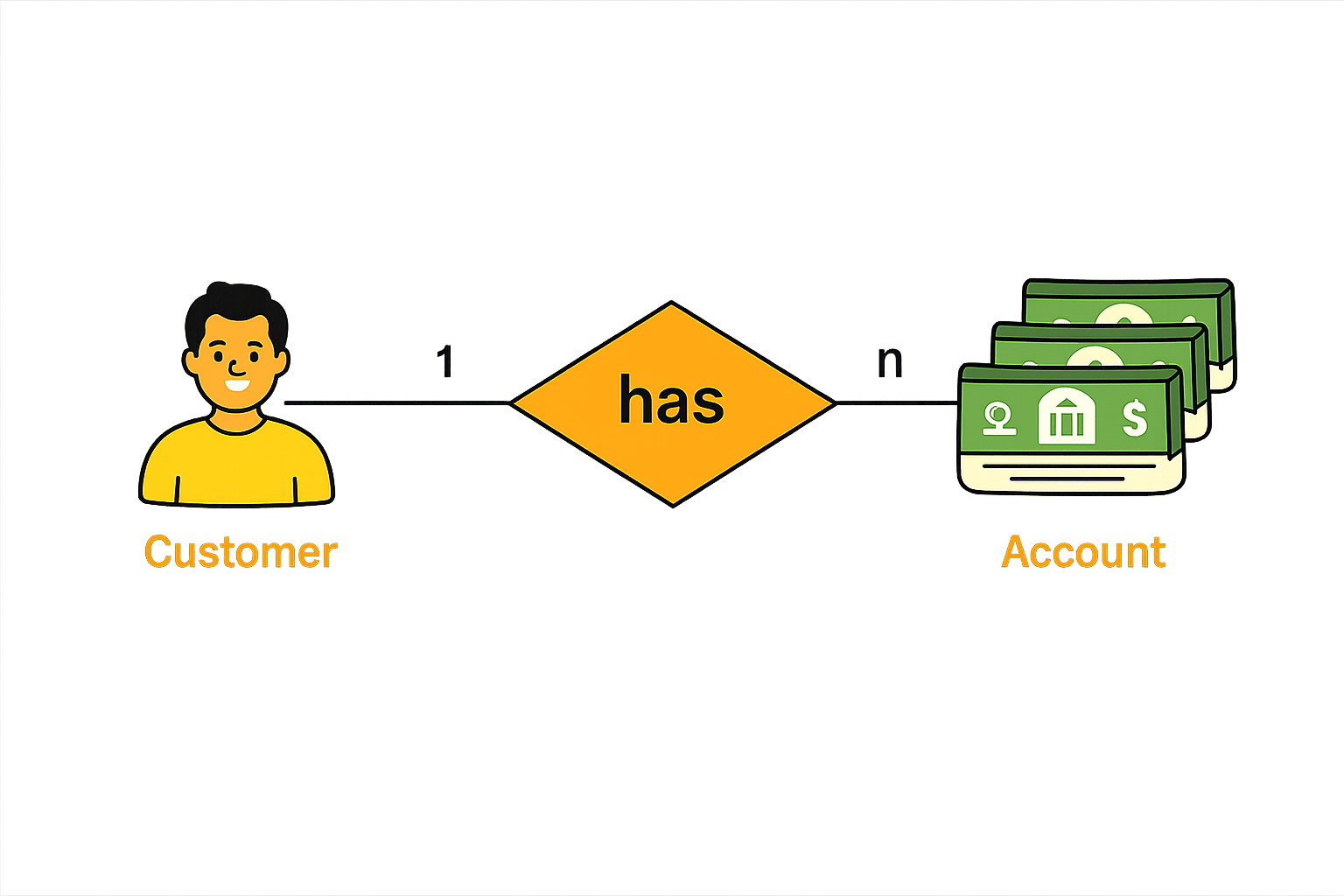
Such a relationship exists when each record of one table can be related to one or more than one record of the other table.
For example, If there are two entity type ‘Customer’ and ‘Account’ then each ‘Customer’ can have more than one ‘Account’ but each ‘Account’ is held by only one ‘Customer’.
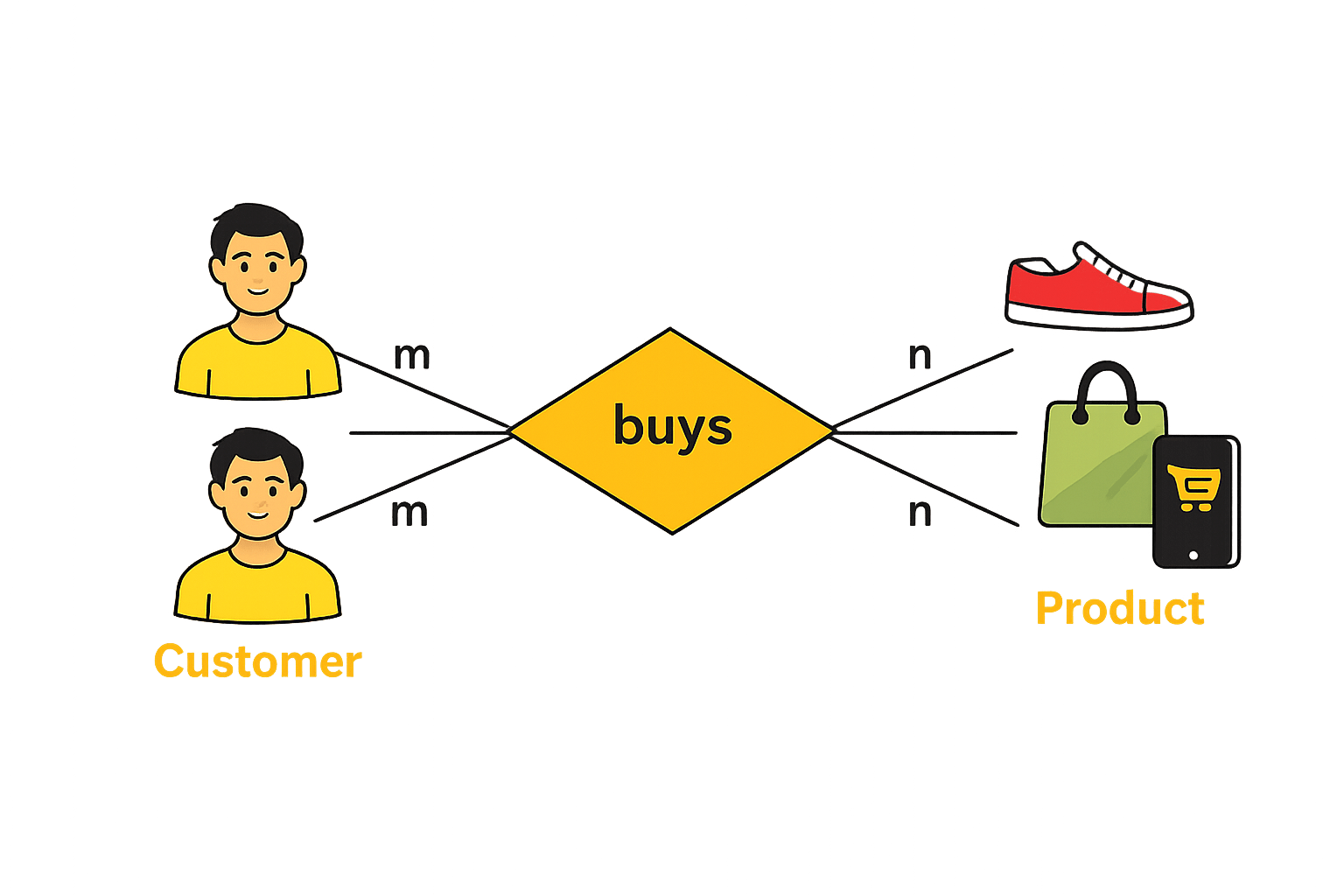
This relationship exists when each record in the first table relates to multiple records in the second table, and vice versa.
For example, If there are two entity type ‘Customer’ and ‘Product’ then each customer can buy more than one product and a product can be bought by many different customers.
One entity is related to only one other entity
One entity is related to multiple entities
Many entities are related to one entity
Many entities are related to many entities
Defines a separate table that links two entities using foreign keys
Defines the foreign key column that connects two related tables
Points to primary key of another table
referencedColumnName
Defines foreign key in join table
joinColumns
Defines the non-owning side of relationship
mappedBy
import jakarta.persistence.*;
import java.util.List;

@Entity
public class User {

    @Id
    @GeneratedValue
    private Long id;
    private String name;

    @OneToMany(mappedBy = "user")
    private List<Order> orders;
}
import jakarta.persistence.*;
import java.util.Set;
@Entity
public class Order{
@Id
@GeneratedValue
private Long id;
@ManyToOne
@JoinColumn(name="user_id")
private User user;
@ManyToMany
@JoinTable(name="order_product",
joinColumns=@JoinColumn(name="order_id"),
inverseJoinColumns=@JoinColumn(name="product_id"))
private Set<Product> products;
}
User.java
Order.java
import jakarta.persistence.*;
import java.util.Set;

@Entity
public class Product {

    @Id
    @GeneratedValue
    private Long id;
    private String name;

    // Many products can belong to many orders
    @ManyToMany(mappedBy = "products")
    private Set<Order> orders;
}
Product.java
A unidirectional relationship is a relationship where only one entity knows or references the other entity.
Order
Customer
Get User from Order
Possible
Get Orders from User
Not Possible
Order
Customer
Get User from Order
Possible
Get Orders from User
Possible
A bidirectional relationship is when both entities know each other and can access data in both directions.
Fetch is a strategy that defines when related (associated) data is loaded from the database.
It decides whether data is loaded immediately or only when needed
EAGER Fetch
LAZY Fetch
Loads data only when needed
Loads related data immediately
@ManyToMany(fetch = FetchType.EAGER)
private Set<Product> products;
@ManyToMany(fetch = FetchType.LAZY)
private Set<Product> products;
Products are also loaded immediately
Cascade is a feature that automatically applies operations from a parent entity to its related child entities.
When you perform action on parent, same action applies to child
Applies all operations (persist, remove, merge, etc.)
CascadeType.ALL
CascadeType.PERSIST
Saves parent + child together
CascadeType.REMOVE
Deletes child when parent is deleted
CascadeType.MERGE
Updates child when parent is updated
In Spring Data JPA, query methods are abstract methods declared in a repository interface used to retrieve or modify data in a database
Spring Data JPA automatically generates the underlying query implementation at runtime based on the method signature, eliminating the need to write boilerplate code
Derived query methods are query methods where the query is derived from the method name itself.
Here,
Method name = Query logic
Spring parses method name and builds query
import org.springframework.data.jpa.repository.JpaRepository;
import java.util.List;
public interface UserRepository extends JpaRepository<User, Long> {
    List<User> findByName(String name);
    List<User> findByAgeGreaterThan(int age);
    List<User> findByNameAndAge(String name, int age);
}
findByreadBygetBycountByexistsBydeleteByExample: findBy
After the prefix, chain the names of your entity's properties you want to query by.
Each property name should start with an uppercase letter.
Example: findByUsername
Refine your queries by adding logical operators or comparison keywords between properties. These allow for complex conditions.
And, OrBetween, LessThan, GreaterThanLike, Containing, InExample: findByUsernameAndEmail
Like
A custom query method is a repository method where the query is written manually using the @Query annotation.
import org.springframework.data.jpa.repository.*;
import org.springframework.data.repository.query.Param;
import java.util.List;
public interface UserRepository extends JpaRepository<User, Long> {
    @Query("SELECT u FROM User u WHERE u.age > :age")
    List<User> getUsersAboveAge(@Param("age") int age);
}When to Use
Complex queries
Joins between entities
Aggregations (COUNT, SUM)
When method names become too long
Simple Meaning
Instead of relying on method names,
we write our own query (JPQL or SQL)
import org.springframework.data.jpa.repository.*;
import org.springframework.data.repository.query.Param;
import java.util.List;
public interface UserRepository extends JpaRepository<User, Long> {
    @Query("SELECT u FROM User u WHERE u.age > :age")
    List<User> getUsersAboveAge(@Param("age") int age);
}
Used to manually write the query that should be executed by Spring Data JPA.
:age is a named parameter placeholder inside the query.
@Param is used to bind the method parameter to the named parameter in the query.
Combine multiple conditions
findByNameAndAge(String name, int age);
Core Concepts (Slide 7)
Core Concepts (.....Slide N-3)
Summary
5
Build strong branding
4
Use different marketing channels
3
Target the right audience
2
Create and communicate value
1
Understand customer needs
Choose cool, soft colors instead of vibrant colors
Max 5 Points for Summary & Min 2
Quiz
Which platform is mainly used for professional networking and B2B marketing ?
A. Facebook
B. Instagram
C. LinkedIn
D. Snapchat
Quiz-Answer
Which platform is mainly used for professional networking and B2B marketing ?
A. Facebook
B. Instagram
C. LinkedIn
D. Snapchat
By Content ITV