






Content ITV
This is Itvedant Content department
Build SmartCart v1 : Setup & API Integration
Business Scenario
Welcome!
Previously, you created model through the GroqCloud API, measured token usage, explored textspliting into tokens, checked context-window limits, tested Temperature, Top-P, and Max Tokens & built a reusable recommender script for different use cases
Today, your manager has assigned you a task to set up LangChain for SmartCart AI and connect it to the Qwen model using GroqCloud. You will install LangChain, store the API key safely, and write a Python script that sends a shopping prompt to the model and displays both the input and the response.
Git Pull
git pull origin branchNamePre-Lab Preparation
Topic : Build Chatbot V1
1) Orchestration Framework
2) Langchain
3) Prompt Templates
Dataset :
Task 1: Install Langchain
!pip install -q langchain langchain-groq
from importlib.metadata import version
print("langchain      :", version("langchain"))
print("langchain-groq :", version("langchain-groq"))
Task 2: Environment Setup and API Key Authentication
Create the project files
1
%%writefile requirements.txt
langchain==1.0.3
langchain-groq==1.0.1
%%writefile .gitignore
.env
__pycache__/Load the API key into the environment and check it
2
import os
from google.colab import userdata

os.environ["GROQ_API_KEY"] = userdata.get("GROQ_API_KEY")

key = os.environ["GROQ_API_KEY"]
print("Key loaded:", key[:4] + "..." + key[-4:])   # never print the full key
print("Key length:", len(key))
Use fake key to see authentication failure
3
from langchain_groq import ChatGroq
bad_llm = ChatGroq(model="qwen/qwen3.8-27b", api_key="gsk_fake_key_123")
try:
    bad_llm.invoke("hello")
except Exception as error:
    print(type(error).__name__, "-", error)
Output
Task 3 : Make a Single LLM API Call with LangChain
Create a chat model
1
from langchain_groq import ChatGroq

llm = ChatGroq(
    model="qwen/qwen3.8-27b",
    temperature=0.7,
    max_tokens=300,
    model_kwargs={"top_p": 0.95},   # top_p is passed through model_kwargs
    reasoning_effort="none",        # thinking off, same as Labs 7 and 8
)

response = llm.invoke("Recommend 3 gym earbuds under Rs. 2,000, one line each.")
print(response.content)
Output
Task 4 : Understand the Request Structure
from langchain_core.messages import HumanMessage

request = [
    HumanMessage(content="Recommend 3 gym earbuds under Rs. 2,000, one line each.")
]

for message in request:
    print("role   :", message.type)
    print("content:", message.content)

response = llm.invoke(request)
Output
Task 5 : Understand the Response Structure
print("Type          :", type(response).__name__)
print("Content       :", response.content[:60], "...")
print("Token usage   :", response.usage_metadata)
print("Model name    :", response.response_metadata["model_name"])
print("Finish reason :", response.response_metadata["finish_reason"])
Output
Task 6 : Control Length with Max Tokens
%%writefile smartcart_v1.py
import os
from langchain_groq import ChatGroq
from langchain_core.messages import HumanMessage
Save the script
1
%%writefile smartcart_v1.py
import os
from langchain_groq import ChatGroq
from langchain_core.messages import HumanMessage

# 1. Authentication: stop early with a clear message if the key is missing
if not os.environ.get("GROQ_API_KEY"):
    raise SystemExit("GROQ_API_KEY not found. Add it to Colab Secrets (Lab 9, Task 2).")

# 2. Model: created once, reused for every request
llm = ChatGroq(
    model="qwen/qwen3.8-27b",
    temperature=0.7,
    max_tokens=300,
    model_kwargs={"top_p": 0.95},
    reasoning_effort="none",
)


def ask_smartcart(shopper_request):
    """Send one shopping request and return the AIMessage."""
    prompt = (
        "You are SmartCart's shopping assistant. Recommend 3 products "
        "for the request below, one line each, with an approximate "
        f"price in rupees.\nRequest: {shopper_request}"
    )
    request = [HumanMessage(content=prompt)]   # 3. Request structure
    return llm.invoke(request)                 # 4. Single API call


if __name__ == "__main__":
    shopper_request = input("What are you shopping for? ")
    response = ask_smartcart(shopper_request)
%%writefile smartcart_v1.py
import os
from langchain_groq import ChatGroq
from langchain_core.messages import HumanMessage

# 1. Authentication: stop early with a clear message if the key is missing
if not os.environ.get("GROQ_API_KEY"):
    raise SystemExit("GROQ_API_KEY not found. Add it to Colab Secrets (Lab 9, Task 2).")

# 2. Model: created once, reused for every request
llm = ChatGroq(
    model="qwen/qwen3.8-27b",
    temperature=0.7,
    max_tokens=300,
    model_kwargs={"top_p": 0.95},
    reasoning_effort="none",
)


def ask_smartcart(shopper_request):
    """Send one shopping request and return the AIMessage."""
    prompt = (
        "You are SmartCart's shopping assistant. Recommend 3 products "
        "for the request below, one line each, with an approximate "
        f"price in rupees.\nRequest: {shopper_request}"
    )
    request = [HumanMessage(content=prompt)]   # 3. Request structure
    return llm.invoke(request)                 # 4. Single API call


if __name__ == "__main__":
    shopper_request = input("What are you shopping for? ")
    response = ask_smartcart(shopper_request)

    # 5. Response structure
    usage = response.usage_metadata
    print("\n" + response.content)
    print(f"\n[model: {response.response_metadata['model_name']}"
          f" | tokens in: {usage['input_tokens']}"
          f" | out: {usage['output_tokens']}"
          f" | finish: {response.response_metadata['finish_reason']}]")
Run the script and type shopping request
2
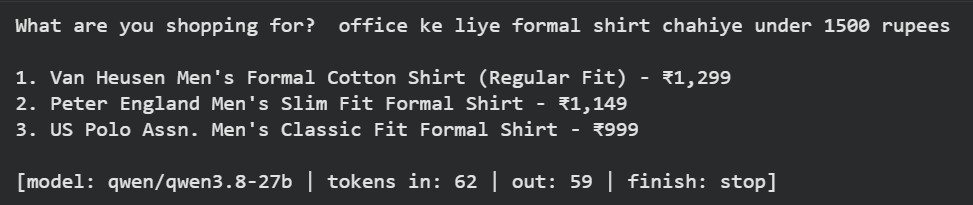
%run smartcart_v1.pyOutput
Insert your request in the box : office ke liye formal shirt chahiye under 1500 rupees
Import the script from a normal cell and test it on other prompts.
3
from smartcart_v1 import ask_smartcart

tests = [
    "gym earbuds under Rs. 2,000",
    "smartphone with good camera and fast charging under 5000 rupees",
    "healthy snacks for office under 500 rupees",
]

for shopper_request in tests:
    response = ask_smartcart(shopper_request)
    usage = response.usage_metadata
    print(f"{shopper_request[:40]:<40} | out tokens: {usage['output_tokens']:>3}"
          f" | finish: {response.response_metadata['finish_reason']}")
Output
Git Push
git push origin branchName
Great job!
You have successfully installed LangChain and the GroqCloud connector, secured the API key, managed dependencies in requirements.txt, and explored API authentication errors. You made LLM calls using ChatGroq and invoke(), examined message-based request and AIMessage response, and built smartcart_v1.py as the foundation for SmartCart AI v1.
Checkpoint
Next-Lab Preparation
Topic : Build Chatbot V1 : Baseline
1) Conversational Loop
2) Handling User Input
3) Basic Error Handling & Testing
By Content ITV