
Content ITV PRO
This is Itvedant Content department
CartSure Test Documentation & RTM Creation
Business Scenario
Today is the 6th day of our project journey.
We are in the Test Documentation & RTM Creation Phase for CartSure, focusing on documenting test cases and mapping requirements for critical features like registration, cart, checkout, payment, and order tracking.
This phase ensures complete requirement coverage and structured quality assurance planning.
Pre-Lab Preparation
Topic : Testing Techniques
git pull origin branchNameGit Pull
Task 1: Create RTM
Example:
FR_001: User can login with valid credentials
FR_002: User can search products
FR_003: User can add product to cart
FR_004: User can checkout successfully
Collect Requirements
a
Entry Criteria: Requirements document available
Exit Criteria: Test scenarios and RTM prepared
Example for CartSure:
Scope: Test all modules (Login, Browsing, Cart, Checkout)
Testing types: Functional, Integration, Regression, UAT
Resources: 2 QA testers, 1 automation tester
Timeline: 2 weeks for functional testing, 1 week for regression
Entry Criteria: Approved requirement document
Exit Criteria: Test plan ready and approved
Test Case Development
c
Test Planning
b
Entry Criteria: Test plan approved
Exit Criteria: Test cases and test data ready
d
Test Environment Setup
Example for CartSure:
Setup QA server with CartSure app installed
Database seeded with products and test users
Browsers: Chrome, Firefox
Devices: Desktop and Mobile
| Test Case ID | Module | Scenario | Test Data | Expected Result |
|---|---|---|---|---|
| TC_001 | Login | Valid Login | Username: User1, Password: Pass123 | User logged in successfully |
| TC_002 | Login | Invalid Login | Username: User1, Password: Wrong123 | Error Message Displayed |
| TC_003 | Cart | Add to Cart | Product: iPhone 14 | Item added to cart |
Entry Criteria: Test cases ready
Exit Criteria: Environment ready
d
Test Execution
Example for CartSure:
Execute TC_001 → Login successful → Pass
Execute TC_002 → Error message appears → Pass
Execute TC_007 → Item added to cart → Pass
If a bug occurs (e.g., product price not updating in cart), log in Jira
Entry Criteria: Stable build available
Exit Criteria: All test cases executed; defects logged & retested
Test Closure
e
Example for CartSure:
Prepare Test Summary Report:
Total test cases: 50
Passed: 47
Failed: 3
Lessons learned: Checkout module needs additional performance testing
Sign-off: Stakeholders approve testing completion
Entry Criteria: Test execution completed
Exit Criteria: Testing closure report ready and signed off
Task 2: Define Entry & Exit Criteria
Entry Criteria
Requirements approved
Test plan ready
Exit Criteria
All test cases executed
Critical defects fixed
Test summary report completed
Stakeholder approval received
Test environment available
Test data prepared
Task 3:Identify Testing Types
| Testing Type | CartSure Example |
|---|---|
| Functional | Check login, add to cart, checkout work correctly |
| Integration | Add to cart --> Proceed to checkout --> Validate price & item |
| Regression | After bug fix in login, retest other login scenerios |
| UAT | Business user tests product browsing & checkout flow |
| Performace | 100 users browse & checkout simultaneously |
| Security | Check user password encryption & secure payment |
Objective
Ensure CartSure application meets functional, integration, performance, and security requirements.
Identify and resolve defects early to deliver a high-quality product.
Create testing strategy outline
Scope
In-Scope:
Login module
Product Browsing module
Cart module
Checkout module
Integration and end-to-end workflows
Out-of-Scope:
Internal systems of third-party payment gateways
Non-critical cosmetic UI issues
Testing Approach
Manual Testing: Validate functional workflows and UI/UX.
Regression Testing: Re-run tests after bug fixes.
Automation Testing (optional): For repeated regression test scenarios.
Performance Testing: Verify system under load (optional).
Security Testing: Ensure secure login, payment, and data protection.
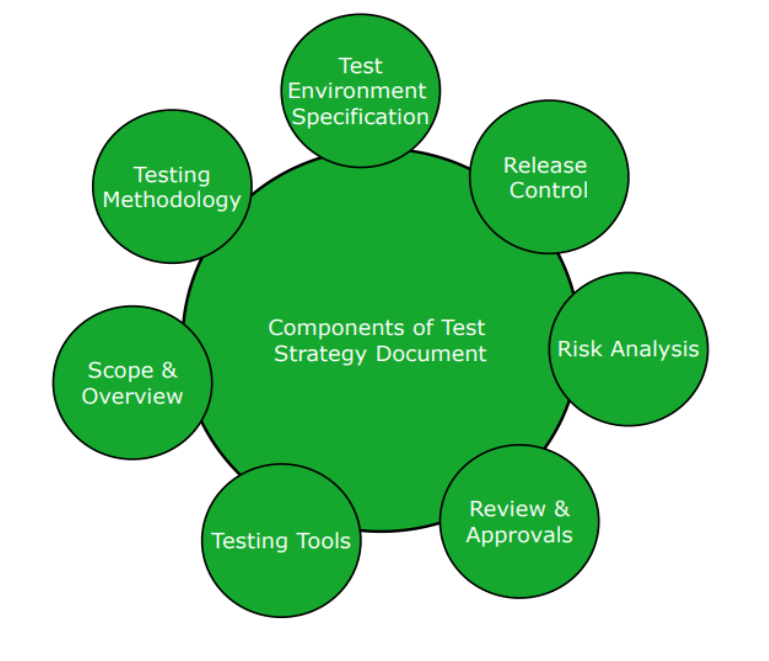
Components of test Strategy Document :
Output
Testing strategy document
Test Strategy Template
These are the most common sections:-
1. Objective
State the objectives of this document at a high-level
2. Scope
State the scope of the testing strategy, what will the testing concentrate around, at high-level; leave details for the Testing Scope.
3. Test Deliverables
State the testing activities and what documents result from these activities; for example a testing activity is Test Planning and the document resulting is the Master Test Plan or Test Plan
4. Testing Schedule
Give the timelines around which the project is planned and where testing fits in this schedule. I find that a diagram has a high-impact on the user (a Georgia rule of thumb is that I use color and diagrams to break the boredom of the text). Describe the diagram in words.
5. Test Scope
The Project Charter or Master Test Plan usually state all the items in scope, just copy and paste from these documents. Add anything that's missing or has changed from the last review. Then state any items that are Out of Scope.
6. Risk Analysis
State all the risk that you envision, the higher the risk the higher the test priority. When you start testing you will want to start with the high-priority items, then test medium-priority and if time permits test low-priority functionality.
By Content ITV