

Next.js - authentication
Next.js - authentication
NextAuth.js - intro

NextAuth.js
NextAuth.js is a complete open-source authentication solution for Next.js applications. It is designed from the ground up to support Next.js.
- Source (NextAuth.js docs)
NextAuth.js
- ⚠️ NextAuth.js → Auth.js → Better Auth
- We will use NextAuth.js v4.x
- Documentation source: NextAuth.js
NextAuth.js
- Simplifies authentication and authorization
- Supports numerous authentication providers
- Supports numerous databases incl. SQLite 🎉
NextAuth.js
- Session-based authentication, either:
- JSON Web Tokens (JWTs)
- Database → adapters (e.g. Prisma 🎉)
- Access session data on:
- Client (useSession)
- Server (getServerSession)
NextAuth.js
npm install next-auth@4.24.11-
Demo repository (branch: initial-setup)
- .env → DATABASE_URL="file:./dev.db"
- npm install
- npx prisma migrate dev
NextAuth.js
# macOS
openssl rand -base64 32
# Windows can use https://generate-secret.vercel.app/32
Generate random encoded string
Add environment variables in .env
DATABASE_URL="file:./dev.db"
NEXTAUTH_URL=http://localhost:3000
NEXTAUTH_SECRET=yourencodedstring
NextAuth.js
// File: /src/app/api/auth/[...nextauth]/route.ts
import NextAuth from "next-auth";

const handler = NextAuth({
  // our configuration will go here
});

export { handler as GET, handler as POST };
Providers
- Specify one or multiple authentication providers
- Github
- Username & password
- ...
Providers
- NextAuth: 4 categories of providers
- Built-in OAuth provider (Google, Github etc.)
- Custom OAuth provider
- Email (magic links)
→ requires e-mail server - Credentials (username & password)
OAuth providers
- Advantages of built-in OAuth providers:
- User doesn't need another account, password ...
-
Offload significant functionality e.g.
- Registration
- Reset password
- Two-factor authentication (2FA)
- ...
OAuth providers
- Disadvantages of built-in OAuth providers:
- Provider gets more data
- Less control over implementation
Next.js - authentication
Username & password (credentials)
Credentials
Example provider: username & password (Credentials)
npm install bcrypt
npm install -D @types/bcryptbcrypt: used for hashing a user's password
Credentials
User model should have at least following fields:
model User {
  id             String  @id @default(cuid())
  email          String  @unique
  hashedPassword String
}- Migrate your database after making these changes
- ⚠️ Why a string as id?
Credentials
Oefening
-
Pas de seed file aan zodat je applicatie overweg kan met dit nieuwe schema
- Hash wachtwoorden met Bcrypt Hash Generator
import NextAuth, { NextAuthOptions } from "next-auth";
import CredentialsProvider from "next-auth/providers/credentials";
import prisma from "@/lib/client";
import bcrypt from "bcrypt";

/* We define authOptions as a separate constant and export it,
 * so it can be used as an argument for other functions that require it (e.g. getServerSession)
 */
export const authOptions = {
  providers: [
    CredentialsProvider({
      // Properties "name" and "credentials" define what we see on the /api/auth/signin page
      name: "e-mail address and password",
      credentials: {
        email: {
          label: "E-mail address",
          type: "text",
          placeholder: "john.doe@example.com",
        },
        password: { label: "Password", type: "password" },
      },
      /* Function below captures the credentials from the fields defined above and checks if they are valid.
       * If not, return null -> this will show an error on the log-in page. If valid, return a user object. */
      async authorize(credentials, req) {
        if (!credentials?.email || !credentials?.password) {
          return null;
        }
        const user = await prisma.user.findUnique({
          where: { email: credentials.email },
        });
        if (!user) {
          return null;
        }
        const passwordsMatch = await bcrypt.compare(
          credentials.password,
          user.hashedPassword!
        );

        return passwordsMatch ? user : null;
      },
    }),
  ],
  // This defines that we use a JWT instead of a database to capture session data
  session: {
    strategy: "jwt",
  },
}

const handler: NextAuthOptions = NextAuth(authOptions);

export { handler as GET, handler as POST };
Oefening
- Voeg met Datagrip een nieuwe gebruiker toe
- Hash een wachtwoord met Bcrypt Hash Generator
- Genereer cuid met Online cuid generator
- Meld je aan via http://localhost:3000/api/auth/signin
Credentials
Token & session
Token & session
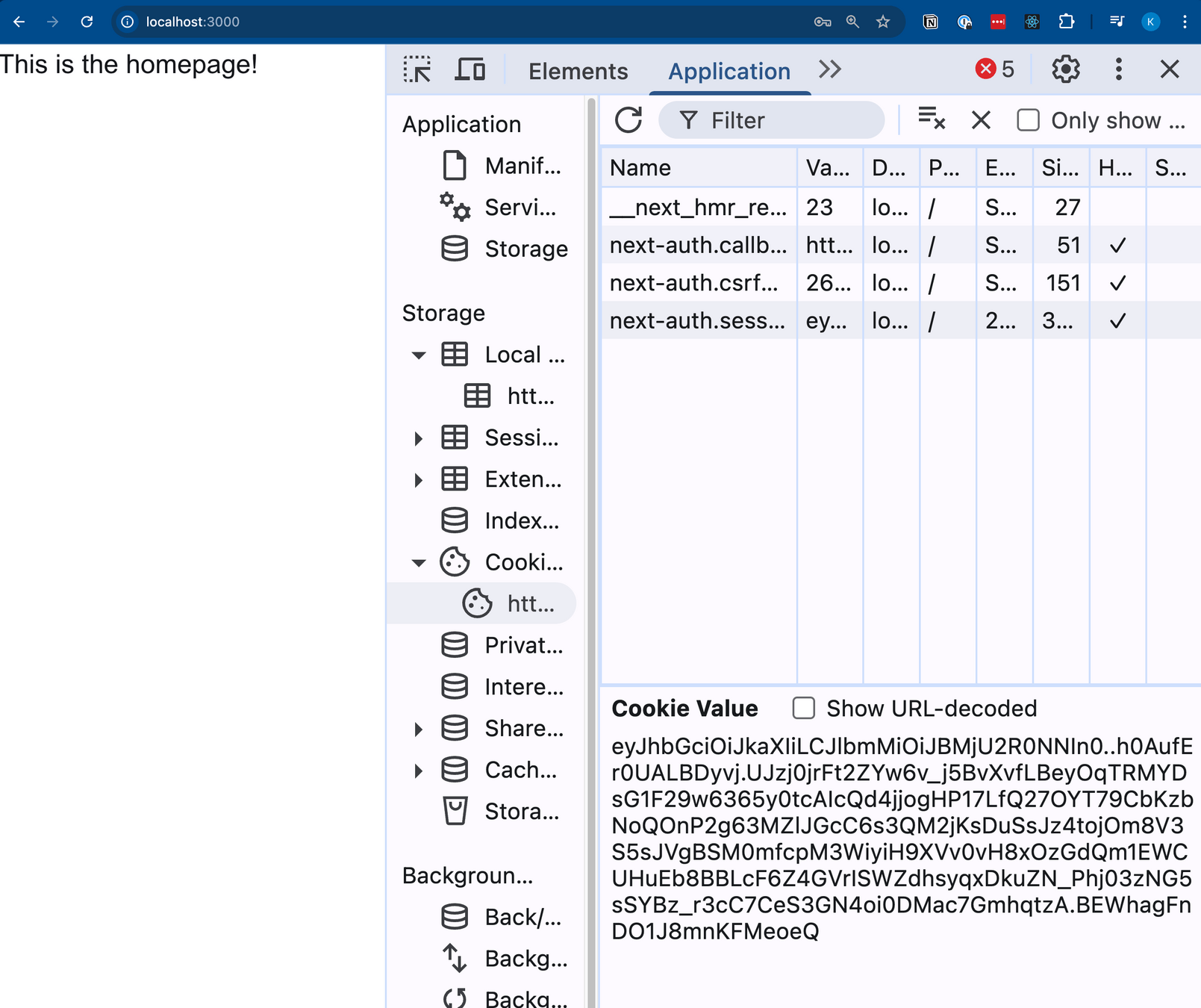
Debugging: wat zit er in onze session & token?
- Nieuw endpoint: /api/auth/token
// File: /src/app/api/auth/token/route.ts
import { getServerSession } from "next-auth";
import { getToken } from "next-auth/jwt";
import { NextRequest, NextResponse } from "next/server";
import { authOptions } from "../[...nextauth]/route";

export async function GET(request: NextRequest) {
  const token = await getToken({ req: request });
  const session = await getServerSession(authOptions);
  return NextResponse.json({
    token: token,
    session: session,
  });
}
Token & session
Debugging: wat zit er in onze session & token?
{
  "token": {
    "name": "Karel De Smet",
    "email": "karel.desmet@arteveldehs.be",
    "sub": "cmgjddudj000004jxgup94s7n",
    "iat": 1760034597,
    "exp": 1762626597,
    "jti": "aa145055-0019-482e-8202-3cf8060c8e4a"
  },
  "session": {
    "user": {
      "name": "Karel De Smet",
      "email": "karel.desmet@arteveldehs.be"
    },
  }
}
Token & session
Debugging: wat zit er in onze session & token?
- iat → Issued at (epoch time)
- exp → Expiry date (epoch time)
- sub → Unique id (in this case: user id)
Token & session
So should I use session or token data?
- Session data: available on client and server
- Token data: available only on server
- ⚠️ NextAuth cookies are httpOnly
Next.js - authentication
Protecting routes
Middleware
To register middleware in Next.js:
- New file (inside src): middleware.ts
- Export a function named middleware
- Export an object named config
- matcher: routes to apply the middleware
Middleware
export const config = {
  // *: zero or more
  // +: one or more
  // ?: zero or one

  // This will match /posts, /posts/1 and /posts/1/a
  matcher: ["/posts/:id*"],

    // This will match /posts and /posts/1
  matcher: ["/posts/:id?"],

  // This will match /posts/1 and /posts/1/a
  matcher: ["/posts/:id+"],
};
Middleware
NextAuth.js has built-in middleware that automatically redirects to the sign-in page if the user is not logged in
// The line below will import the default object and export it in one line
export { default } from "next-auth/middleware";

export const config = {
  matcher: ["/posts"],
};
Protecting routes
Oefening
- Branch: protecting-routes (git fetch --all)
- Make sure /posts/:id is only accessible for
authenticated users
Next.js - authentication
Customization
Sign-in page
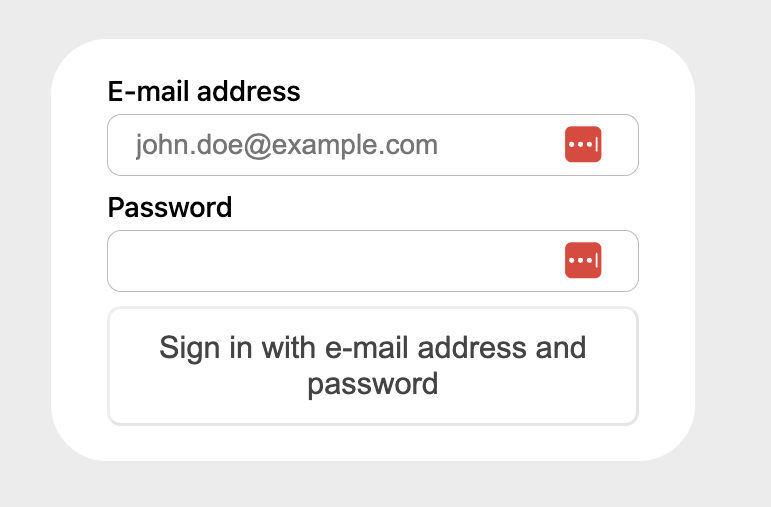
We're still stuck with the default sign-in page.
You can customize it with Theming or a custom page.
User registration
Oefening
- Branch: registering-users (git fetch --all)
- Nieuwe route: /register → registratieformulier
- 2 input velden: e-mail + password
- Hash het wachtwoord met bcrypt
- Sla de data op in de database
Next.js - authentication
User roles
User roles
⚠️ NextAuth default middleware:
- No built-in support for roles
- Next.js: no support for middleware chaining
User roles
Oefening (demo repository):
- Maak een enum Role in schema.prisma
- STANDARD
- ADMIN
- Voeg een veld role toe aan model User
- Migreer de database
- Maak een seed script aan
(→ minstens 1 admin & 1 user)
User roles
Add the role to session and token data
// In route.ts:
export const authOptions: NextAuthOptions = {
    // leave providers untouched,
    // leave session untouched,
    callbacks: {
      // This adds the userId to the session data so we can use it on client (useSession) and server (getServerSession)
      session: async ({ session, token }) => {
        const user = await prisma.user.findUnique({
          where: { email: session?.user?.email ?? undefined },
        });
        if (user?.id) {
          session.role = user?.role;
        }
        return session;
      },
      // This adds the user's role to the token data so we can use it in middleware
      jwt: async ({ token, user }) => {
        if (user && "role" in user && user.role) {
          token.role = user.role;
        }

        return token;
      },
    },
}
User roles
Inform TS about the extended session object
→ this is called module augmentation (TS docs)
import NextAuth from "next-auth";
import { Role } from "@/lib/client";

declare module "next-auth" {
  interface Session {
    role: Role;
  }
}
User roles
// Create src/middleware.ts
import { withAuth } from "next-auth/middleware";

export default withAuth(
  // `withAuth` augments your `Request` with the user's token.
  function middleware(req) {
    if (!req.nextauth.token || !req.nextauth.token.role) {
      // Anonymous user
    }
    if (req.nextauth.token.role === "STANDARD") {
      // Default user
    }
    if (req.nextauth.token.role === "ADMIN") {
      // Administrator
    }
  }
);

export const config = {
  matcher: ["/secure-page", "/admin-page"],
};
User roles
User should not have access?
→ redirect to an appropriate page (example below)
import { NextResponse } from "next/server";

/* This will redirect a user from our middleware or API route to the sign-in page
 * Attention: always use relative URLs -> https://nextjs.org/docs/messages/middleware-relative-urls */
function middleware(req) {
  return NextResponse.redirect(new URL("/api/auth/signin", req.url));
}

export const config = {
  matcher: ["/secure-page", "/admin-page"],
};
User roles
Putting it all together
import { withAuth } from "next-auth/middleware";
import { NextResponse } from "next/server";

const adminRoutes = ["/admin-page"];

export default withAuth(
  // `withAuth` augments your `Request` with the user's token.
  function middleware(req) {
    if (!req.nextauth.token || !req.nextauth.token.role) {
      return NextResponse.redirect(new URL("/api/auth/signin", req.url));
    }
    if (req.nextauth.token.role === "STANDARD") {
      if (adminRoutes.includes(req.nextUrl.pathname)) {
        return NextResponse.redirect(new URL("/api/auth/error", req.url));
      }
    }
  }
);

export const config = {
  matcher: ["/secure-page", "/admin-page"],
};
Sign-out page
Oefening (deel 2):
- Probeert een ingelogde gebruiker (USER) een pagina te laden die admin-rechten vereist?
→ redirect naar een custom error-pagina - Voorzie op elke pagina een link om uit te loggen
(URL: /api/auth/signout)
Accessing the session
Need session data on a server page or client component?
// On the client
const { data: session, status } = useSession();

// On the server
const session = await getServerSession(authOptions);
Accessing the session
Another approach for role-based access:
- Use default middleware from next-auth
- Set config to protect all "logged-in" routes
- Check in each page individually using getServerSession