Provisioning AWS Infrastructure using Ansible Playbooks

Pre-Lab Preparation
-
Ansible is installed.
-
AWS CLI is configured.
-
AWS credentials are available.
-
Boto3 and Botocore are installed.
-
AWS connectivity is verified.
-
IAM permissions for EC2 are available.

Task 1: Verify AWS Connectivity
1
Verify AWS account access
aws sts get-caller-identity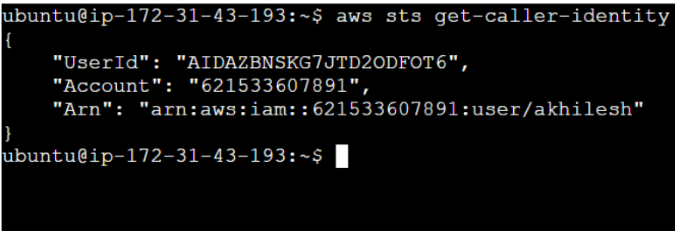
2
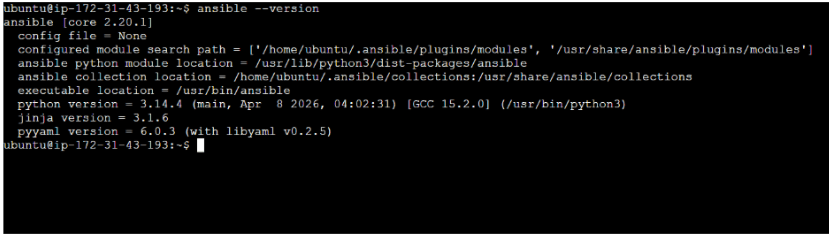
Verify Ansible installation
ansible --version
Task 2: Create Working Directory
1
Create a project directory.
mkdir ansible-aws
cd ansible-aws
Task 3 : Create Ansible Playbook
1
Create a playbook file
vi ec2-create.yml
2
Add the following playbook
name: Launch EC2 Instance
  hosts: localhost
  connection: local
  gather_facts: no
Task 4 : Verify Playbook Syntax
1
Validate the playbook
ansible-playbook -i inventory ec2-create.yml

Task 5 : Execute Playbook
1
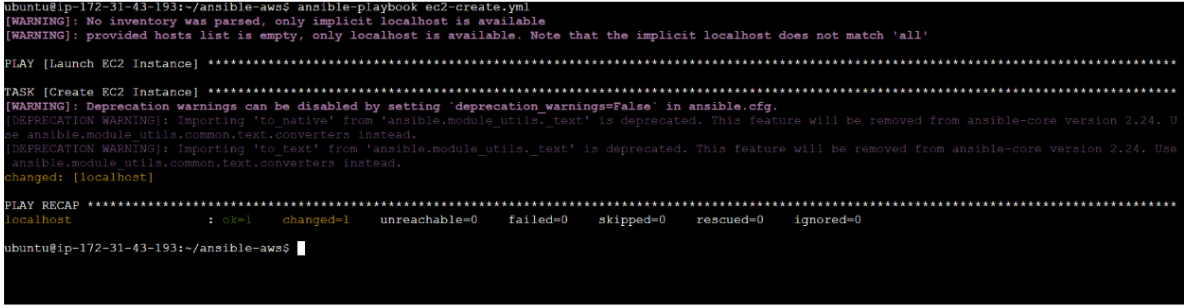
Run the playbook
ansible-playbook ec2-create.yml
2
Verify successful execution
Expected Output:
PLAY RECAP
failed=0
Task 6 : Verify EC2 Instance
1
Open AWS Console
Navigate to: EC2→ Instances

Great job!
-
Verified AWS connectivity.
-
Created an Ansible Playbook.
-
Provisioned an EC2 instance.
-
Executed and reviewed the Playbook.
-
Verified the created resource.
-
Terminated the instance after testing
Checkpoint