CSS Layouts and Responsive Design


Display, Positioning, Float, and Z-Index


Learning Outcome
5
Use float, clear, and z-index properties.
4
Manage element placement using position offsets.
3
Apply various CSS positioning techniques effectively.
2
Control element visibility and webpage layout.
1
Understand different CSS display property behaviors.
What Is Display Property?
The CSS `display` property controls how an HTML element is presented in the layout
It defines :
Whether element starts on new line

Whether element starts on new line
Whether it takes full width
Whether it remains inline
Display values :
block
inline
inline-block
Display values and its effects
The element generates a block-level box, which means it starts on a new line and takes up the full width available
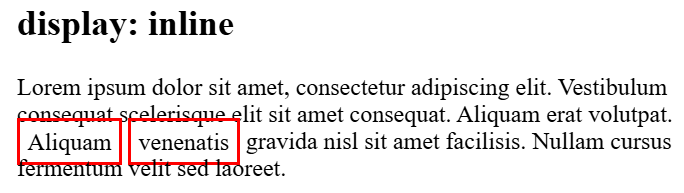
Display values and its effects
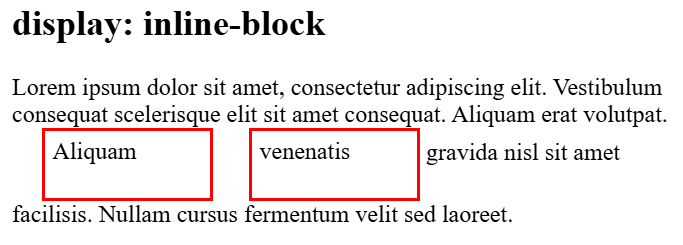
It can sit next to other elements on the same line while still respecting height and width properties
Display values and its effects
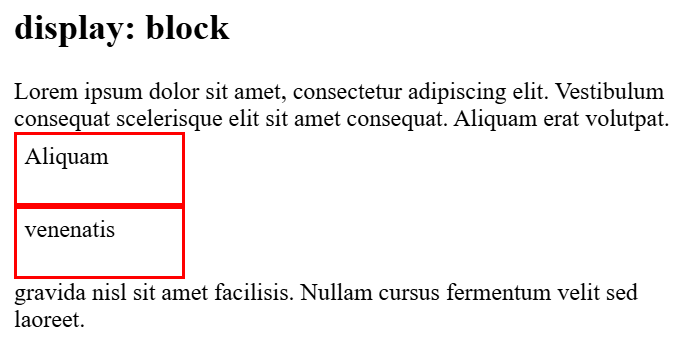
It can sit next to other elements on the same line while still respecting height and width properties
Visibility Property
The visibility property determines if an element is visible, but unlike display: none, a hidden element still takes up space, allowing you to toggle visibility without affecting surrounding content.
div{
visibility:hidden;
}
hidden
Space preserved — the dashed box shows where the element still occupies layout space even when invisible.
Property
Space reserved
display:none;
visibility:hidden
NO
YES
Space reserved
Now that we have explored CSS Display Properties, let's understand CSS Position Properties
What Is Positioning Property?
The CSS `position` property controls how an HTML element is positioned within its container or the viewport
Static
This position places the elements one below the other i.e document flow
Note: Static position elements don’t follow top/right/bottom/left properties
Container
Relative Positioning Property
Relative
This position places the elements relative with its original position
Note: Relative position elements follow top/right/bottom/left properties
Container
Absolute Positioning Property
Absolute
The element is removed from normal document flow and positioned relative to its nearest positioned ancestor(container)
Container
Container
Fixed Positioning Property
An element with position: fixed is removed from the normal document flow and stays fixed relative to the browser window, even when the page is scrolled.
Sticky Positioning Property?
An element with position: sticky behaves like a relative element until a specified scroll position is reached, then it sticks to that position while scrolling.
Offset Properties ( Top, Right, Left, Bottom )
Used with positioned elements (relative, absolute, fixed, sticky) to control exact placement. These offset properties have no effect on static elements
div {
position: absolute;
top: 20px;
right:50px;
}
Container
top:20px;
right:50px;
Z-Index — Stacking Order
Controls the stacking order of overlapping positioned elements. A higher z-index value means the element appears on top of elements with lower values. Z-index only works on positioned elements (not static).
div {
position: absolute;
z-index: 10;
}
z-index:1
z-index:5
z-index:10
Higher z-index = on top
Positive numbers — higher = on top
Negative numbers — behind
auto — default stacking
What Is Float Property?
The float property positions an element left or right, enabling text to wrap around it. Initially for images, float was later used for page layouts before Flexbox and Grid.
Float:right
img {
float: right;
}
IMG
Float:left
img {
float: left;
}
IMG
Clear Property
The clear property prevents elements from wrapping around floated elements. Use clear to force an element below any floats.
Value
Purpose
left
Clears left float
Clears right float
right
both
Clears both sides
none
Default
div {
clear: both;
}

Why Modern CSS Avoids Float for Layouts
Layout breaking issues
Parent height collapsing
Difficult responsive design handling
Alignment problems
Modern alternatives: Flexbox & CSS Grid provide robust, predictable layout systems that solve all float-based issues.

Resolution
Summary
5
Float and clear help organize layouts.
4
Z-index manages overlapping element stacking order.
3
Position property controls element placement precisely.
2
Visibility property hides elements while reserving space.
1
Display property controls element rendering behavior.
Quiz
Which CSS property controls how an element is displayed?
A. visibility
B. display
C. float
D. position

Which CSS property controls how an element is displayed?
A. visibility
B. display
C. float
D. position
Quiz-Answer
