Major Java 8 Features Introduced


Streamline Your Data: Streams, Operations, and Comparators


Learning Outcome
5
Use parallel streams and understand lazy execution.
4
Apply method chaining and functional-style programming.
3
Use intermediate and terminal stream operations effectively.
2
Differentiate between collections and streams.
1
Understand the concept and purpose of the Stream API
Collections framework (List, Set, ArrayList, etc.)
OOP basics (objects and method calls)
Lambda expressions (basic idea of () -> {})
Interfaces and methods in Java
Iteration concepts (for loop, enhanced for loop)

Before Starting ,Lets Recall

What is Stream API?
Allows developers to perform operations like filtering, sorting, mapping, and reducing data with less code.
Streams API in Java 8 processes collections of data in a functional and efficient way.
Definition

Allows method chaining (multiple operations in one line)
Supports lazy evaluation (runs only when needed)
Can run in parallel for better performance
Makes code short, clean, and readable
Works on collections, arrays, and I/O channels



Collections Streams
Collections
|
Store and manage data |
It is a Data structure
Can modify elements
Works with External iteration (loops)
Focuses on Data storage
Streams
Process and transform data
It is a Data processing pipeline
Does NOT modify original data
Works with Internal iteration (Stream API)
Focuses on Data computation

Stream Operations
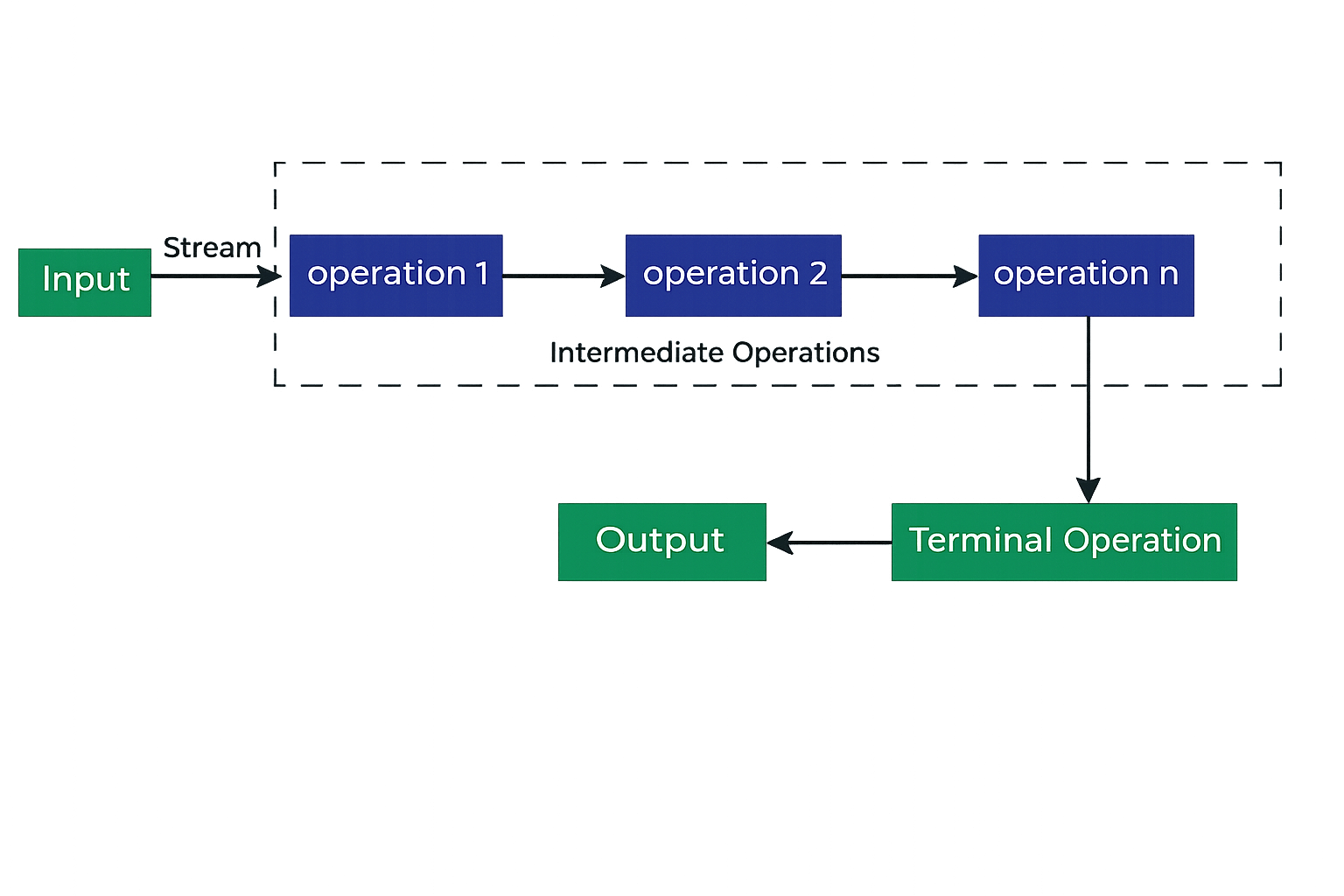
2.Terminal Operations (eager)

Triggers processing
Returns result or performs action
Examples: forEach(), collect(), reduce(), count(), anyMatch()
1.Intermediate Operations (lazy)
Return a new stream
Not executed until terminal operation
Examples: filter(), map(), sorted(), distinct(), limit(), skip()
Creating Streams from Collections
Stream Operations in Action
3. Reduce
List<Integer> nums = Arrays.asList(1, 2, 3, 4); int sum = nums.stream().reduce(0, (a, b) -> a + b); System.out.println("Sum: " + sum);
2. Map
names.stream()
.map(String::toUpperCase)
.forEach(System.out::println);
1. Filter
names.stream()
.filter(n -> n.startsWith("A"))
.forEach(System.out::println);
List<String> names = Arrays.asList("Amit", "Neha", "Ravi"); Stream<String> nameStream = names.stream();

What is Java Parallel Streams?
A parallel stream in Java is a feature introduced in Java 8 that automatically leverages multiple CPU cores to process data from a collection or array simultaneously, rather than sequentially.
When to Avoid

- Small data sets
- I/O heavy tasks
- Order-sensitive operations
-
Large datasets (10,000+ elements)
-
CPU-intensive operations
- Splittable data sources
When to Use

When to Use
names.parallelStream()
.forEach(System.out::println);
Example

Summary
5
Streams can run in parallel to improve performance.
4
They do not store data but act as a data processing pipeline
3
Streams use method chaining and lazy evaluation.
2
It supports operations like filter, map, sort, and reduce.
1
The Stream API processes collection data in a functional way.
Quiz
Which of the following is an intermediate operation in Stream API?
A. collect()
B. forEach()
C. Filter()
D. count()

Which of the following is an intermediate operation in Stream API?
A. collect()
B. forEach()
C. Filter()
D. count()
Quiz-Answer
