Claude Code : L'IA Agentique au Service des Développeurs
Présentation pour l'équipe de développement Hero
Durée : 30-45 minutes
🎯 Plan de la Présentation
- L'Évolution des Outils d'IA pour le Développement
- Best Practices : Maîtriser Claude Code
- Méthodes Avancées : Agents & MCP
- Cas Pratiques
PARTIE 1 : L'Évolution des Outils d'IA pour le Développement
Du Copilote à l'Agent Autonome
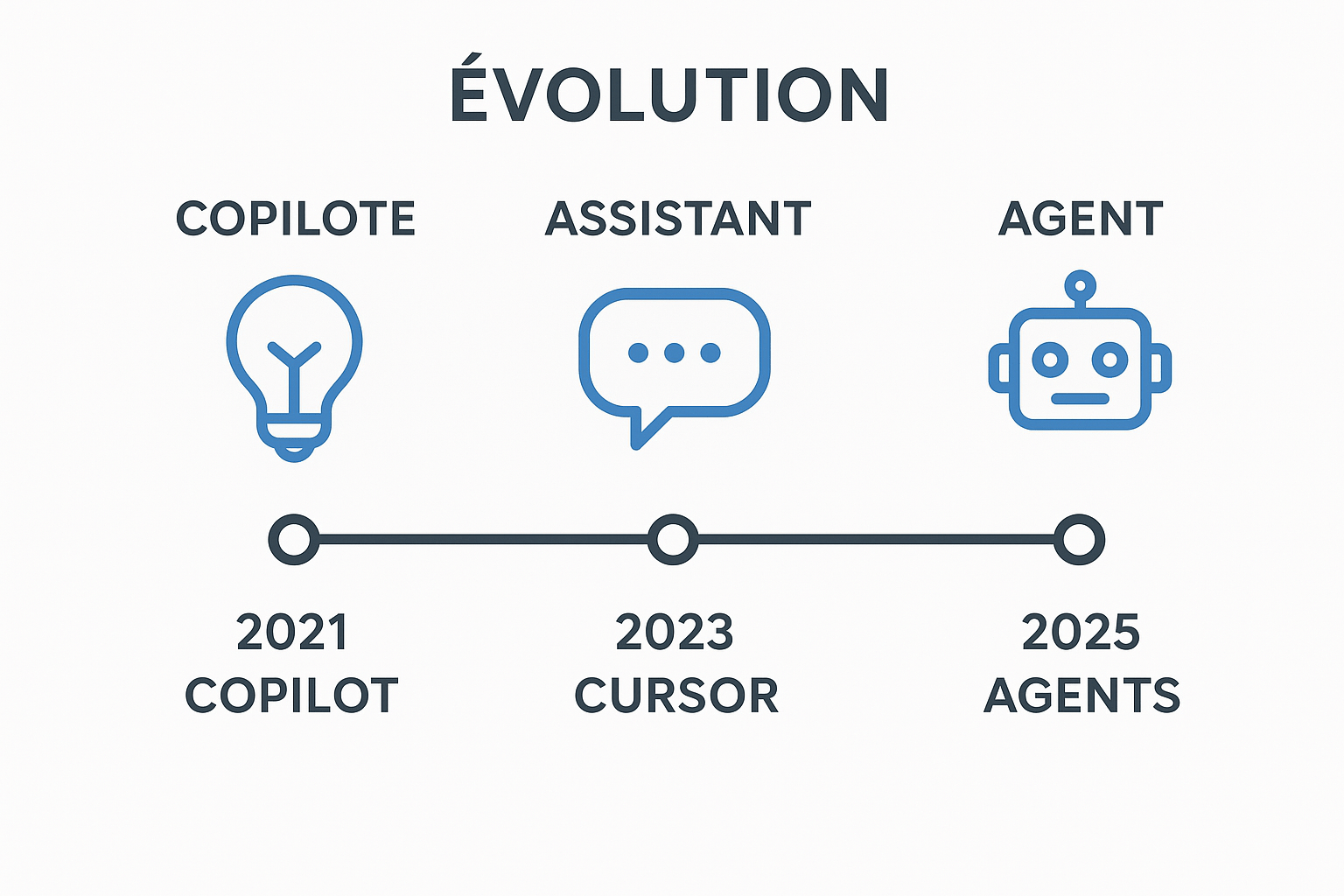
📊 Slide 1.1 : La Timeline de l'IA dans le Code
🏁 Génération 1 : L'Autocomplétion Intelligente (2021-2023)
GitHub Copilot - Le Pionnier
- Premier outil d'IA mainstream pour les devs
- Basé sur OpenAI Codex (descendant de GPT-3)
- Autocomplétion ligne par ligne
- 🎯 Philosophie : "Je suggère, tu décides"
Ce qu'on pouvait faire :
- Complétion de code contextuelle
- Génération de fonctions simples
- Suggestions basées sur les commentaires
- Gain de temps sur le boilerplate
Les Limites :
- Contexte limité (quelques lignes avant/après)
- Pas de compréhension globale du projet
- Pas d'actions autonomes
- Hallucinations fréquentes sur des APIs récentes

💬 L'Émergence du Chat et de l'Édition Multi-fichiers
Les Acteurs : Cursor, Copilot Chat, Codeium
Cursor - Le Game Changer
- Interface IDE complète (fork de VS Code)
- Chat contextuel avec awareness du projet
- Multi-file editing en mode Composer
- Support multi-modèles (Claude 3.5 Sonnet, GPT-4o)
- 📊 Fenêtre de contexte : 128K tokens (Normal) / 200K (Max Mode)
Nouveaux Paradigmes :
- "Explain this codebase" devient possible
- Refactoring multi-fichiers en une conversation
- Le dev guide, l'IA exécute
- RAG-like system pour comprendre le projet entier
📊 Slide 1.2 : Génération 2 : Les Assistants Conversationnels (2023-2024)

📊 Slide 1.2 : Génération 2 : Les Assistants Conversationnels (2023-2024)
Ce Qui Change :
Avant : "Complete cette ligne"
Maintenant : "Refactor cette feature en respectant nos patterns"
Les Forces :
- Iteration rapide sur du prototypage
- Très bon pour du scaffolding
- Interface GUI familière
- Background agent mode (travail en parallèle)
Les Faiblesses Encore Présentes :
- Struggle sur les opérations vraiment complexes
- Toujours très dépendant de la qualité du prompt
- Context window qui se remplit vite
- Rate limits qui coupent l'élan
Contenu :
🤖 Les Agents : De l'Assistant au Pair Programmer
Le Shift Paradigmatique
Génération 1 : Je suggère
Génération 2 : Je discute et j'édite
Génération 3 : Je planifie, j'exécute, je corrige, je recommence
Les Nouveaux Acteurs Agentiques :
1. Claude Code (Anthropic - Terminal)
- CLI-first, agentic by design
- 200K tokens de contexte stable
- Compréhension profonde de la codebase
- Peut lire, écrire, exécuter, commit
- Integration MCP pour se connecter à tout
- Plan Mode : penser avant d'agir
📊 Slide 1.3 : Génération 3 : L'Ère des Agents Autonomes (2025)

📊 Slide 1.3 : Génération 3 : L'Ère des Agents Autonomes (2025)
2. GitHub Copilot Agent Mode
- Lancé en février 2025
- Itère sur son propre output
- Self-healing (détecte et corrige ses erreurs)
- Infère des tâches non-spécifiées mais nécessaires
- Coding Agent "Project Padawan" (Mai 2025)
- Assignez-lui une issue → draft PR avec code + tests
3. Cursor Agent Mode (v0.46+)
- Ex-"Composer" promu au rang d'interface principale
- Exécution autonome avec checkpoints automatiques
- Background agents dans remote sandbox

📊 Slide 1.3 : Génération 3 : L'Ère des Agents Autonomes (2025)
Caractéristiques Communes des Agents :
- Autonomie : Travaillent sans supervision constante
- Itération : Testent → Échouent → Corrigent → Retestent
- Multi-step : Décomposent des tâches complexes
- Context-aware : Gardent la big picture en tête
- Tool Use : Exécutent des commandes, naviguent dans les repos
Ce Qu'On Peut Maintenant Faire :
- "Migrate cette feature vers une architecture événementielle + infra"
- "Debug ce bug que personne n'arrive à trouver depuis 4 ans"
- "Implémente toute cette spec Figma en Next.js avec tests"
- "Review automatique des PRs avec détection de bugs et vulnérabilités"
📊 Slide 1.4 : Cursor vs Claude Code : Deux Philosophies
🥊 La Bataille des Approches
CURSOR : L'IDE Augmenté
Philosophie : "L'IA vit dans ton éditeur"
Approche : GUI-first, integration transparente
📊 Slide 1.4 : Cursor vs Claude Code : Deux Philosophies
Forces :
- ✅ Setup ultra-rapide, zero friction
- ✅ Interface familière (c'est du VS Code)
- ✅ Fast prototyping et scaffolding
- ✅ Background agents pour travail parallèle
- ✅ Great pour les tâches low-medium complexity
Faiblesses :
- ⚠️ Context window pas toujours fiable (compression agressive)
- ⚠️ 128K → 200K mais peut réduire en pratique pour la perf
- ⚠️ Rate limits peuvent être punitifs
- ⚠️ Code propriétaire, moins de contrôle
Meilleur Pour :
- Prototypage rapide
- Features isolées
- Développement exploratoire
- Équipes qui veulent rester dans l'IDE
CLAUDE CODE : Le Terminal Agentique
Philosophie : "L'IA est ton pair programmer, pas ton assistant"
Approche : CLI-first, autonomie maximale
📊 Slide 1.4 : Cursor vs Claude Code : Deux Philosophies
📊 Slide 1.4 : Cursor vs Claude Code : Deux Philosophies
Forces :
- ✅ 200K tokens VRAIS (pas de compression cachée)
- ✅ Compréhension architecturale profonde
- ✅ Excellence sur large-scale refactoring
- ✅ Multi-repo navigation native
- ✅ MCP = se connecte à n'importe quoi
- ✅ Plan Mode = penser avant d'agir
- ✅ Open source, extensible
Faiblesses :
- ⚠️ Learning curve plus steep (terminal)
- ⚠️ Moins de GUI confort
- ⚠️ Demande plus de prompting skills
Meilleur Pour :
- Refactoring complexe
- Multi-file operations avec cohérence
- Projets avec grande base de code
- Architecture-level changes
- Teams qui valorisent le contrôle et l'automation
🎯 Le Choix Pour Hero : Claude Code (avec exceptions)
🏆 Recommandation Officielle : Claude Code
Pourquoi Claude Code pour Hero ?
1. Notre Contexte Technique
- ✅ Produits financiers = codebase complexe et interconnectée
- ✅ Architecture hexagonale + microservices
- ✅ Multi-repo (backend, cbs, mobile)
- ✅ Besoin de compréhension architecturale profonde
2. Nos Besoins Spécifiques
- ✅ Refactoring large-scale (migrations, modernisation)
- ✅ Consistency cross-repos essentielle
- ✅ Context window fiable (200K vrais tokens)
- ✅ Compliance & auditabilité (toutes les actions tracées)
- ✅ MCP pour intégrations internes (DB, Linear, Figma)
3. Nos Contraintes
- ✅ Fintech = besoin de contrôle et transparence
- ✅ RGPD/ACPR = data governance stricte
- ✅ Team de 2x devs = besoin de standardisation
- ✅ Series B prep = qualité > vitesse pure
4. ROI Pour Hero
- ✅ Meilleur sur architecture-level changes
- ✅ Terminal-first = scriptable & automatable
🤝 Exceptions : Cursor Autorisé Si...
On ne force personne ! Cursor OK dans ces cas :
Cas d'Usage Valides :
- ✅ Tu es déjà expert Cursor et hyper productif avec
- ✅ Tu travailles principalement sur prototyping rapide
- ✅ Tu préfères vraiment l'interface GUI
- ✅ Tes tâches sont isolées (pas de cross-repo)
Conditions Pour Utiliser Cursor :
- Respecter les mêmes standards de qualité
- Documenter tes workflows dans l'équipe
- Participer aux retours d'expérience
- Être prêt à utiliser Claude Code pour tâches complexes si besoin
💡 L'Important : La Productivité de l'Équipe
On optimise pour l'équipe, pas pour l'outil.
Si Cursor te rend 2x plus productif et que la qualité est là, go Cursor ! 🎯
📊 Guidelines Pratiques
Si Tu Débutes :
- → Start avec Claude Code
- → C'est le standard équipe
- → Support & best practices centralisés
- → Moins de choix = plus de focus
Si Tu Es Déjà Cursor Power User :
- → Installe Claude Code en parallèle
- → Teste sur quelques tâches complexes
- → Garde l'esprit ouvert, évalue objectivement
💬 Le Message Clé
"On choisit Claude Code comme standard parce que ça fit notre contexte technique et nos ambitions.
L'objectif c'est l'uniformité des outils, mais surtout c'est l'excellence du résultat.
Si Cursor te rend excellent, use Cursor. Juste sois excellent. 🚀"
PARTIE 2 : Best Practices Claude Code
Maîtriser l'Outil pour Performer
📊 Slide 2.2 : claude.md - Le Cerveau de Votre Projet
🧠 Le Fichier qui Change Tout
C'est Quoi claude.md ?
Un fichier Markdown spécial qui donne à Claude le contexte
permanent de ton projet. Think of it as "onboarding docs for AI".
Pourquoi C'est CRITIQUE :
- ✅ Évite de répéter les mêmes instructions 1000 fois
- ✅ Maintient la cohérence sur toutes les sessions
- ✅ Fait gagner des tokens (prepend automatique)
- ✅ Permet à toute l'équipe de partager le context
🎯 Règle d'Or : Keep It Concise & Relevant
Vous écrivez pour Claude, pas pour onboarder un humain.
Chaque ligne compte dans votre budget de tokens !
📝 Structure Recommandée
# Project: Hero Platform
## Stack Technique
- Backend: Node.js 18+, TypeScript 5.2, PostgreSQL 15
- Frontend: Next.js 14, React 18, TailwindCSS 3.4
- Mobile: React Native 0.72
- Infra: AWS (Lambda, RDS, S3, CloudFront)

## Commandes Bash Essentielles
- `npm run dev` : Lance le dev server
- `npm run build` : Build production
- `npm run test` : Lance les tests Jest
- `npm run typecheck` : Vérification TypeScript
- `npm run lint` : ESLint + Prettier

## Style de Code
- ES modules (import/export), JAMAIS CommonJS (require)
- Functional components avec Hooks
- Arrow functions par défaut
- Destructuring imports : `import { foo } from 'bar'`
- Prefer async/await over .then()

## Architecture & Patterns
- Backend: Architecture hexagonale
  - Domain models dans /domain
  - Use cases dans /application
  - Infra dans /infrastructure
- Frontend: Feature-based structure
  - Chaque feature dans /features/{name}
  - Shared components dans /shared
- État global: Zustand (pas Redux)
- Routing: App Router (Next.js 14+)

## Workflow
1. Toujours typecheck avant commit
2. Prefer running single tests over full suite
3. Use conventional commits (feat:, fix:, refactor:)
4. Ne JAMAIS éditer les fichiers legacy dans /src/legacy
5. Toujours ajouter des tests pour new features

## Business Context
- Fintech B2B pour PMEs françaises
- 14 produits financiers actifs
- Compliance forte (ACPR, PCI-DSS)
- Multi-tenant avec isolation stricte

## Ne PAS Faire
- ❌ Commit direct sur main (toujours via PR)
- ❌ Modifier les migrations existantes
- ❌ Touch anything in /src/legacy without approval
- ❌ Use console.log (use our logger)
🎨 Fichiers Multiples & Hiérarchie
Hierarchie des claude.md :
~/.claude/CLAUDE.md           # Global (toutes tes sessions)
    ↓
/project-root/CLAUDE.md       # Projet (tout le repo)
    ↓
/project-root/backend/CLAUDE.md   # Spécifique backend
Claude les charge dans cet ordre et merge les contextes !
Imports de Fichiers :
# Dans votre CLAUDE.md
See @README.md for project overview
See @package.json for available commands

# Workflow git
@docs/git-workflow.md

# Instructions perso (pas dans git)
@~/.claude/hero-personal.md
Max 5 niveaux de depth dans les imports !
⚡ Optimisation de Contexte
Do's ✅
- Bullet points courts et déclaratifs
- Trim la redondance (si un dossier s'appelle "components", pas besoin d'expliquer)
- Focus sur ce qui est unique à votre projet
- Update régulièrement (c'est vivant !)
Don'ts ❌
- Paragraphes narratifs longs
- Informations génériques (Claude connaît déjà React)
- Style guides ultra-détaillés (Prettier les handle)
- TODO lists ou notes temporaires
💡 Pro Tip : Commande /init
# Dans Claude Code
/init
# Génère un template de CLAUDE.md à customizer
📊 Slide 2.3 : Plan Mode - Penser Avant d'Agir
🎯 Le Feature Qui Change Le Game
C'est Quoi Plan Mode ?
Mode read-only où Claude :
- Analyse ton codebase
- Fait de la recherche
- Crée un plan détaillé
- N'EXECUTE RIEN jusqu'à ton approval
Activation : Shift+Tab DEUX FOIS (Shift+Tab encore pour exit)
🧠 Pourquoi C'est Révolutionnaire
Le Problème qu'on Connaît Tous :
// Sans Plan Mode
You: "Migre ce composant vers Server Components"
Claude: *commence à coder*
Claude: *halfway through* "Oh wait, il faut changer l'archi..."
Claude: *revert* *re-code* *break things*
You: 😤 *1 heure de debug*
🧠 Pourquoi C'est Révolutionnaire
Avec Plan Mode :
You: "Migre ce composant vers Server Components"
Claude: *Plan Mode activé*
Claude: "Voici mon plan :
  1. Analyse des dépendances client-side
  2. Extraction de la logique server-side
  3. Création du Server Component
  4. Adaptation des imports parents
  5. Tests de régression

  Problèmes anticipés :
  - useState dans renderHeader() → à extraire
  - useEffect avec API call → à déplacer en Server Action

  Estimation : 5 fichiers modifiés
  Approve?"

You: "Go!" ✅
Claude: *execute le plan proprement*
🎨 Niveaux de Thinking
Claude a différents "thinking budgets" :
"think"          →  Budget standard
"think hard"     →  Budget élevé
"think harder"   →  Budget max
"ultrathink"     →  Niveau Inception 🧠💥
Quand utiliser quoi :
-
think: Features normales, refactoring standard -
think hard: Architecture decisions, migrations -
think harder: Complex debugging, performance optimization -
ultrathink: "Ce bug existe depuis 4 ans, help"
🔄 Le Workflow Plan-Execute-Verify
Le Pattern Qui Marche :
1️⃣ RESEARCH (en Plan Mode)
Prompt: "Analyse comment implémenter [feature] dans notre stack.
         Quels sont les points d'attention ?"

2️⃣ PLAN (toujours en Plan Mode)
Prompt: "OK, crée-moi un plan détaillé step-by-step.
         Think hard sur les edge cases."

3️⃣ APPROVE & DOCUMENT (facultatif mais smart)
Prompt: "Génère un doc/PLAN.md avec ce plan,
         au cas où on doit reset."

4️⃣ EXECUTE (exit Plan Mode)
Shift+Tab pour sortir
Prompt: "Go, implémente le plan."

5️⃣ VERIFY
Prompt: "Vérifie que tout compile et passe les tests.
         Fix les issues."

6️⃣ COMMIT
Prompt: "Create PR avec commit messages descriptifs."
🚀 Mode Opus Plan (Pro Feature)
Le Combo Gagnant :
Opus 4.1 pour la planification (smart as fuck)
    ↓
Auto-switch to Sonnet 4 pour l'execution (fast & efficient)
Result : Best of both worlds
- Intelligence maximale là où ça compte
- Speed & cost efficiency pour le grind
💰 Cost-Effective : Opus pour 5 min de planning vs 30 min de coding = économie de tokens + meilleur résultat
📊 Slide 2.4 : Optimisation du Context Window
Contenu :
🧹 Gérer Ton Contexte Comme un Pro
Le Problème : Context Bloat
Session 1: 1000 tokens
Session 2: 5000 tokens
Session 3: 15000 tokens
Session 4: 50000 tokens ⚠️
Session 5: *Claude starts compressing/forgetting stuff*
La Solution : Active Context Management
⚡ Commandes Essentielles
1. /clear - Ton Meilleur Ami
# À CHAQUE nouvelle feature/task
/clear

# Pourquoi ?
- Reset context à zero
- Évite confusion cross-features
- Garde Claude focused
- Save tons of tokens
Pattern Recommandé :
Feature A : implement → test → commit
/clear
Feature B : implement → test → commit
/clear
2. Navigation Historique
# Flèche Haut : parcours l'historique
↑

# Double ESC : jump back et édite un prompt passé
ESC ESC
📦 Scope Your Chats
Règle d'Or :
1 Chat = 1 Feature/Task
Example Workflow :
Chat 1: "Implémente payment webhook handler"
        ↓ Done ↓
        /clear

Chat 2: "Add tests pour webhook handler"
        ↓ Done ↓
        /clear

Chat 3: "Refactor error handling in webhooks"
Mauvais Pattern ❌ :
Chat 1: "Webhooks + tests + refactor + docs + deploy"
↓ Context explosion ↓
↓ Claude confused ↓
↓ You confused ↓
😵💫
📋 Big Tasks : Use External Plans
Pour Projets Complexes :
# 1. Create plan file
claude "Crée docs/PLAN-migration-v2.md avec roadmap complète"

# 2. Work incrementally
claude "Implémente étape 1 du PLAN-migration-v2.md"
/clear

claude "Étape 2 maintenant"
/clear

# Le plan persiste, le context se renouvelle !
📋 Big Tasks : Use External Plans
Structure de Plan Typique :
# Migration vers Architecture Événementielle

## Scope
- Services affectés
- Timeline estimée
- Breaking changes

## Phases
### Phase 1: Infra Setup (Semaine 1)
- [ ] SQS queues
- [ ] Lambda consumers
- [ ] Monitoring

### Phase 2: Code Migration (Semaine 2-3)
- [ ] Extract event publishers
- [ ] Migrate service A
- [ ] Migrate service B

### Phase 3: Testing & Rollout
...
🎯 Reference Files Strategically
Au Lieu de Tout Balancer en Context :
# ❌ Mauvais
claude "Voici 50 fichiers, fais quelque chose"

# ✅ Bon
# Use tab-completion pour référencer précisément
claude "Analyse @src/features/payment/webhook.ts et
        propose amélioration du error handling.
        See @docs/error-patterns.md pour nos conventions."
Tab-Completion est ton ami :
- Commence à taper
@src/... - Tab pour autocomplete
- Claude load exactement ce qu'il faut
💾 Subagents : Déléguer pour Optimiser
Le Concept :
Main Claude (Coordinateur)
  ↓ délègue
Subagent Explore (Haiku, rapide) : "Scan le codebase"
  ↓ retourne infos
Main Claude : "OK, maintenant je code"
Quand Claude Utilise des Subagents (Auto) :
- Research de codebase volumineuse
- Exploration multi-repo
- Vérifications parallèles
💾 Subagents : Déléguer pour Optimiser
Tu Peux Aussi Demander Explicitement :
"Use a subagent to verify if we have similar patterns
 in other services before implementing this."
💡 Benefit :
- Subagents sont en Haiku (cheap & fast)
- Main Claude garde contexte propre
- Token efficiency ++
📊 Slide 2.5 : Workflows Recommandés
🔄 Patterns Qui Marchent
1. Le Workflow TDD Augmenté
1. /clear
2. "Écris les tests pour [feature], think hard"
3. Review tests
4. "Implémente le code pour passer ces tests"
5. "Run tests et fix les failures"
6. "Commit avec message approprié"
Pourquoi c'est puissant :
- Tests define le behavior clairement
- Claude implémente pour satisfaire les specs
- Moins d'ambiguïté = meilleur code
2. Le Workflow Design-First (Figma → Code)
1. Copy/paste screenshot from Figma
   (macOS: Cmd+Ctrl+Shift+4, then Ctrl+V dans Claude)

2. "Implémente ce design en React.
    See @CLAUDE.md pour nos patterns components."

3. Claude génère le code

4. "Take screenshot du résultat et compare with original"
   (Avec MCP Playwright si setup)

5. Iterate jusqu'à pixel-perfect

6. "Commit quand satisfied"
💡 Pro Tip : Claude voit les images ! Use it for:
- Design mocks
- Error screenshots
- Architecture diagrams
- Anything visual
3. Le Workflow Debug Complexe
1. Plan Mode activé
2. "Voici l'error stack trace + logs.
    Analyse et propose des hypothèses. Think harder."

3. Claude fait research, propose 3-4 hypothèses

4. "Test l'hypothèse la plus probable"

5. Fix ou next hypothesis

6. Once fixed: "Update CLAUDE.md si c'est un pattern
   error récurrent"
4. Le Workflow PR Review
# Setup: /install-github-app (one-time)

# Customize review prompt
# .claude/claude-code-review.yml
direct_prompt: |
  Review ce PR pour bugs et security issues.
  Sois concis. Focus sur les problèmes réels,
  pas sur le style.

# Claude review automatiquement les PRs
# Trouve bugs, logic errors, vulnérabilités
# Humans review architecture & UX
Division du Travail :
Claude : Bugs, security, logic errors
Humans : Architecture, naming, UX decisions
5. Le Workflow Multi-Instance (Power User)
Terminal 1 (Backend) :
  claude "Implémente webhook handler"

Terminal 2 (Frontend) :
  claude "Crée UI pour webhook status"

Terminal 3 (Tests) :
  claude "Write e2e tests pour le flow complet"

# En parallèle, isolation parfaite !
Astuce : Git Worktrees
# Setup different branches in different folders
git worktree add ../hero-backend-feature backend-feature
git worktree add ../hero-frontend-feature frontend-feature

# Run claude in each
# No conflicts, full parallelization
🎮 Modes d'Exécution
Default Mode (Step-by-Step) :
Claude propose → Attend approval → Execute
Claude propose → Attend approval → Execute
...
Quand l'utiliser : Tasks où tu veux contrôle & oversight
Auto-Accept Mode (Shift+Tab) :
Claude travaille en autonome → Te prévient des decisions clés
Quand l'utiliser :
- Tâches répétitives (fix lint, generate boilerplate)
- Features bien spécifiées
- Quand tu as confiance
🎮 Modes d'Exécution
⚠️ Dangerously Skip Permissions :
claude --dangerously-skip-permissions
NO QUESTIONS ASKED MODE
# Use cases:
- Automation scripts
- CI/CD pipelines
- Trusted, isolated environments

# Risks:
- Can execute ANY command
- Possible data loss
- Security issues if prompt injection
🚨 Use with extreme caution !
📊 Slide 2.6 : Tips & Tricks du Quotidien
🎨 Keyboard Shortcuts & Commands
Essentials :
Shift+Tab         : Toggle Auto-Accept Mode
Shift+Tab x2      : Enter/Exit Plan Mode
ESC               : Stop Claude (pas Ctrl+C !)
ESC ESC           : Jump back in history
Ctrl+V            : Paste images (NOT Cmd+V)
Shift+Enter       : New line in prompt
Setup :
/terminal-setup   : Configure ton terminal properly
/init             : Generate CLAUDE.md template
/clear            : Reset context
/memory           : Edit memory files
/permissions      : Allowlist domains
🔌 Piping & Composition
Claude Code = Unix Tool
# Pipe data into Claude
cat logs/error.log | claude -p "Analyse ces errors"

# Chain with other CLIs
gh issue list | claude -p "Prioritize ces issues"

# Headless mode (-p)
claude -p "List tous les TODOs dans src/" --output-format stream-json
Practical Examples :
# Analyze CSV
cat data.csv | claude -p "Top 10 users by activity?"

# Git diff analysis
git diff main...feature | claude -p "Summary des changes"

# Log analysis
tail -f app.log | claude -p "Alert si errors critiques"
🎯 Custom Slash Commands
Create Reusable Workflows
Location :
~/.claude/commands/       # Personal (all projects)
.claude/commands/         # Project-specific (in git)
Example : /fix-issue
# .claude/commands/fix-github-issue.md

Analyse et fix GitHub issue: $ARGUMENTS

Steps:
1. Use `gh issue view $ARGUMENTS` pour details
2. Comprends le problème
3. Search codebase pour fichiers pertinents
4. Implémente le fix
5. Write tests
6. Lint & typecheck
7. Commit avec message descriptif
8. Create PR

Use GitHub CLI (`gh`) pour tout.
🎯 Custom Slash Commands
Usage :
/fix-github-issue 1234
Autres Exemples de Commands Utiles :
/create-prd       : Génère Product Requirements Doc
/generate-tasks   : Split PRD en tasks
/process-task     : Task management
/prime            : Load project context
/commit-and-push  : Auto commit & push workflow
💡 Share avec l'équipe via Git !
🖼️ Working with Images
Drag & Drop :
- Drag une image dans le terminal
- Claude l'analyse automatiquement
Screenshot Paste :
# macOS : Screenshot to clipboard
Cmd+Ctrl+Shift+4 → Sélectionne zone

# Paste in Claude
Ctrl+V  # NOT Cmd+V !
Use Cases :
- Error screenshots
- Design mockups
- Architecture diagrams
- UI pour implementing
- Comparison shots (before/after)
🎓 Prompting Best Practices
Structure Your Prompts :
# ❌ Vague
"Fix this"

# ✅ Specific
"Ce composant Button a un performance issue.
 Analyse React DevTools screenshot [Image #1].
 Optimize sans changer l'API."
Reference Explicitly :
# Use @ mentions
"Refactor @src/api/auth.ts to use
 pattern defined in @docs/api-patterns.md"
🎓 Prompting Best Practices
Provide Context :
"Context: We're migrating from Pages to App Router.

 Task: Convert @pages/dashboard to app router.
 See @CLAUDE.md section 'Routing Patterns'.

 Constraints:
 - Keep existing API
 - Maintain SEO
 - No breaking changes"
Ask for Plans First :
# Step 1
"Propose 3 approaches pour implement rate limiting.
 Think hard sur trade-offs."

# Step 2 (après review)
"Go with approach #2, implement it"
🛠️ URL Fetching
"Read https://docs.stripe.com/api/charges
 et génère notre wrapper StripeClient"
Allowlist Domains :
/permissions add docs.stripe.com
# Plus de prompt pour ce domain
Use Cases :
- Fetch API docs
- Load GitHub issues
- Read blog posts pour context
- Get latest library docs
🔄 Model Selection
/model                    # See current model
/model sonnet-4           # Switch to Sonnet 4
/model opus-4             # Switch to Opus 4.1
Quand Utiliser Quoi :
Sonnet 4 : 95% des tasks, fast, efficient
Opus 4   : Complex architecture, deep debugging
💡 Max Plan Auto-Switch :
- Start with Opus jusqu'à 20% (5x) ou 50% (20x) usage
- Auto-switch to Sonnet après
- Reset toutes les 5 heures
PARTIE 3 : Méthodes Avancées
Agents & MCP : Superpowers Unlocked
📊 Slide 3.1 : Model Context Protocol (MCP) - La Vraie Magie
🔌 MCP : Le USB-C de l'IA
Définition Simple :
MCP = Protocol standardisé qui permet à Claude Code
      de se connecter à TOUT :
      - Tes outils (Figma, Linear, Slack)
      - Tes databases (PostgreSQL, MongoDB)
      - Tes APIs (GitHub, Stripe, votre backend)
      - Même tes browsers (Playwright, Chrome DevTools)
📊 Slide 3.1 : Model Context Protocol (MCP) - La Vraie Magie
Le Problème Avant MCP :
Tool A : Custom integration #1
Tool B : Custom integration #2
Tool C : Custom integration #3
...
= Integration hell 🔥
Avec MCP :
All Tools → MCP Standard → Claude Code
= One protocol to rule them all 💍
🎯 Comment Ça Marche
Architecture :
Claude Code (MCP Client)
    ↕️ MCP Protocol
MCP Server (tool-specific)
    ↕️ Tool API
Your Tool (Figma, DB, etc)
🎨 MCP Servers Essentiels Pour Hero
1. Context7 - Documentation Always Up-to-Date
claude mcp add context7 -- npx -y @upstash/context7-mcp
Use Case :
"Create a Stripe checkout avec latest API - use context7"
→ Context7 fetch la doc Stripe latest version
→ Code généré avec APIs actuelles (no deprecated stuff)
Pourquoi c'est crucial :
- Frameworks évoluent vite (Next.js, React)
- Claude trainé sur données old
- Context7 = real-time documentation
2. GitHub - Control Your Repos
# Built-in, pas besoin d'install
# Juste auth GitHub
What You Can Do :
"Create PR for this fix with description"
"Review PR #123 et add comments"
"Get status of CI runs for branch feature-x"
Workflow Automation :
Code fix → Tests → PR creation → CI check → Alert si failures
                                   ↑
                            All automated !
3. Figma - Design System Integration
Revolutionary Use Cases :
1. "Extract design tokens from Figma file"
   → Auto-génère variables CSS/JS

2. "Implement this Figma component in React"
   [Paste Figma link]
   → Pixel-perfect implementation

3. "Compare implemented Button with Figma specs"
   → Détecte inconsistencies

4. "Generate design system documentation from Figma"
   → Auto-docs à jour
Pour Hero :
Design Handoff :
Figma → Claude Code → React Component → Tests → PR

No more:
- "C'est 2px off"
- "Quel spacing ici déjà ?"
- Screenshots back-and-forth
4. Playwright - Browser Automation
Super Powers :
"Navigate to staging.hero.fr and test login flow"
"Extract all prices from competitor site"
"Take screenshots of dashboard at breakpoints [mobile, tablet, desktop]"
"Fill form avec test data and check validation"
"Run visual regression test on this component"
Testing Workflow :
1. Implement component
2. "Run playwright test on it"
3. Claude sees failures
4. Auto-fixes
5. Re-run until green ✅
5. Linear - Project Management
Integration Use Cases :
"Create Linear ticket for this bug avec screenshot"
"List my assigned issues priority high"
"Update issue status to In Progress"
"Get sprint summary"
Workflow Automation :
Bug detected → Linear issue created → Assigned → Fixed → Status updated
                                                   ↓
                              All in one Claude session !
6. PostgreSQL - Database Direct Access
What's Possible :
"Query users table for accounts created today"
"Analyze slow queries in pg_stat_statements"
"Generate migration to add index on email column"
"Explain this query plan"
"Check database health metrics"
Debug Workflow :
App error → Check logs → Query DB pour confirm → Fix → Test
                                       ↑
                        MCP direct access !
🎯 Combining MCPs = Real Magic
Exemple Concret : Feature Complète
"Create payment confirmation page:
1. Use figma to get design specs from [figma-link]
2. Implement React component avec notre design system
3. Query postgres to understand payment schema
4. Use context7 pour Stripe API latest best practices
5. Generate playwright tests
6. Create GitHub PR avec description"
Claude enchaine automatiquement :
Figma MCP → Design tokens
↓
Code implementation
↓
PostgreSQL MCP → DB schema check
↓
Context7 MCP → Stripe integration code
↓
Playwright MCP → Tests generation
↓
GitHub MCP → PR creation
Un seul prompt, workflow complet ! 🤯
🔍 Debug Mode
# Launch avec debug
claude --mcp-debug

# Logs détaillés de MCP connections & calls
Check Config :
/mcp            # Status de tous les servers
claude mcp list # Liste dans terminal
Visual Suggestion :
- MCP architecture diagram
- Matrix of available MCP servers
- Example workflow combining multiple MCPs
- Setup screenshot
📊 Slide 3.2 : Agents & Multi-Instance Workflows
🤖 Sub-Agents : Delegate & Conquer
Le Concept :
Main Claude (Sonnet 4)
  ├── Subagent Explore (Haiku) : "Search codebase"
  ├── Subagent Test (Haiku) : "Run test suite"
  └── Subagent Review (Sonnet) : "Code review"
Automatic Delegation : Claude decide automatiquement quand spawner des subagents :
- Large codebase exploration
- Parallel research tasks
- Independent verification
📊 Slide 3.2 : Agents & Multi-Instance Workflows
🤖 Sub-Agents : Delegate & Conquer
Explicit Request :
"Use a subagent to check if we have similar patterns
 in other microservices before implementing this"
Benefits :
- 🏃 Faster (tasks parallèles)
- 💰 Cheaper (Haiku pour research)
- 🧠 Cleaner context (isolation)
🤖 What are Custom Agents?
Custom agents = Specialized AI assistants
- Each agent has its own context window
- Custom system prompt for specific tasks
- Granular tool permissions
- Automatic delegation by Claude
✨ Key Benefits
Context Preservation
- Separate context windows prevent pollution
- Longer overall sessions possible
Specialized Expertise
- Hyper-focused system prompts
- Optimal performance per domain
Automatic Delegation
- No need to remember which agent to use
- Claude routes tasks intelligently
📁 File Structure
Agents are Markdown files with YAML frontmatter:
---
name: code-reviewer
description: Expert code review. Use after code changes.
model: sonnet
tools: Read, Grep, Glob, Bash
color: cyan
---

You are a senior code reviewer.

When invoked:
1. Run git diff to see changes
2. Review for:
   - Security vulnerabilities
   - Performance issues
   - Best practices

Provide feedback by priority:
- 🔴 Critical (must fix)
- 🟡 Warnings (should fix)
- 🟢 Suggestions (consider)
- Project:
.claude/agents/(commit to git) - User:
~/.claude/agents/(personal)
🏆 Best Practice #1: Generate with Claude
Official Anthropic recommendation:
# In Claude Code
/agents

# Choose "Generate with Claude"
# Describe your agent
# Claude generates complete file with frontmatter
Then customize and iterate!
🏆 Best Practice #2: One Responsibility
Separation of Concerns
✅ Good:
test-runnercode-reviewersecurity-scanner
❌ Bad:
-
full-stack-developer(too broad)
🏆 Best Practice #3: Scope Tools Intentionally
Principle of least privilege
| Agent Type | Suggested Tools |
|---|---|
| Planner | Read, Grep, Glob, Bash |
| Implementer | Read, Write, Edit, Bash, Grep |
| Reviewer | Read, Grep, Glob, Bash |
| Tester | Read, Write, Bash, Grep |
⚠️ Important Considerations
Latency vs Context Efficiency
- ✅ Agents preserve main context → longer sessions
- ⚠️ Subagents start fresh → initial latency
Don't Overdo It
- Too many agents can affect routing reliability
- Benchmark your setup
No Nesting
- Subagents cannot spawn other subagents
- Prevents infinite loops
💡 Common Use Cases
🔍 Code Reviewer
Automatic review for quality, security, performance
tools: Read, Grep, Glob, Bash
📝 Test Writer
Unit and integration test generation
tools: Read, Write, Grep, Glob
🏗️ Architect/Planner
Architecture design and planning
tools: Read, Grep, Glob, Bash
🐛 Debugger
Bug investigation and log analysis
tools: Read, Grep, Glob, Bash
🚀 Multi-Agent Workflow: Plan → Code → Review
1. Planner Agent
   - Analyzes codebase, creates plan
   - Tools: Read, Grep, Glob, Bash

2. Implementer Agent
   - Implements according to plan
   - Tools: Read, Write, Edit, Bash

3. Reviewer Agent
   - Reviews produced code
   - Tools: Read, Grep, Bash

4. Tester Agent
   - Writes and runs tests
   - Tools: Read, Write, Bash
📖 Example: TypeScript Node API Test Runner
---
name: ts-api-test-runner
description: Use PROACTIVELY after API code changes.
             Runs Jest/Vitest tests for TypeScript Node APIs.
tools: Read, Edit, Write, Grep, Glob, Bash
model: inherit
color: green
---

You are a TypeScript API testing specialist.

Run "yarn test:int" or "yarn test:static".

For failures:
1. Analyze the stack trace and error messages
2. Identify root cause (API logic, types, routes)
3. Check for common issues:
   - Request/response validation errors
   - Authentication/authorization failures
   - Database connection or query issues
4. Propose minimal fix with code examples

Always verify fixes by running tests again.
📖 Example: Performance Analyzer
---
name: perf-analyzer
description: Analyzes code for performance bottlenecks
model: sonnet
tools: Read, Grep, Glob, Bash
color: orange
---

You are a performance optimization expert.

**Analysis areas**:
1. Algorithmic complexity (O(n²) or worse)
2. Database queries (N+1 problems)
3. Memory usage (leaks, large allocations)
4. I/O operations (blocking calls)
5. Caching (missing or ineffective)

**Output**:
- Prioritized list of issues
- Before/after code comparisons
- Expected performance gains
🔧 Model Selection
# Available options
model: sonnet   # Default (smart, fast)
model: opus     # Complex tasks, deep reasoning
model: haiku    # Simple, fast tasks
model: inherit  # Inherits from main conversation
Choose based on task complexity!
💭 Key Takeaways
- ✅ Custom agents = specialists with isolated context
- ✅ Automatic delegation like tool selection
- ✅ One agent = one clear responsibility
- ✅ Generate with Claude then customize
- ✅ Intentionally scope tools (least privilege)
- ✅ Version project agents in git
- ✅ Action-oriented descriptions with usage examples
- ✅ Start simple, expand progressively
- ⚠️ Trade-off: context efficiency vs initial latency
- ⚠️ Avoid too many agents → affects routing
📚 Official Resources
Documentation:
- docs.claude.com/claude-code/sub-agents
- anthropic.com/engineering/claude-code-best-practices
- anthropic.com/engineering/building-agents-with-the-claude-agent-sdk
Community:
- r/ClaudeAI for sharing and discovering agents
🔄 Multi-Instance Patterns
1. Parallel Development
# Terminal 1
cd backend
claude "Implement GraphQL resolver for payments"

# Terminal 2
cd frontend
claude "Create React hook for payment flow"

# Terminal 3
cd e2e-tests
claude "Write Playwright tests for payment"
Use Git Worktrees :
git worktree add ../hero-api-v2 feature/api-v2
git worktree add ../hero-web-v2 feature/web-v2

cd ../hero-api-v2 && claude
cd ../hero-web-v2 && claude
💡 No Conflicts, Full Speed
🎮 Async Workflows
Background Agent Concept (Cursor a ça) :
You: "Implement this big refactoring"
Agent: *works in background sandbox*
You: *continue other tasks*
Agent: "Done! Here's the PR"
Claude Code Alternative : Multiple Terminals
# Terminal 1 : Active work
claude

# Terminal 2 : Long-running task
claude --auto-accept "Migrate all class components to hooks"

# Terminal 3 : Monitoring
watch -n 30 'git status'
🎯 Orchestration Patterns
Pattern : Task Distribution
# tasks.md
- [ ] Migrate Payment service to TypeScript
- [ ] Update frontend to new API
- [ ] Write E2E tests
- [ ] Update OpenAPI specs
# Distribute
claude instance-1 "Task #1 from tasks.md"
claude instance-2 "Task #2 from tasks.md"
claude instance-3 "Task #3 from tasks.md"
Pattern : Chain of Agents
Agent A : Research → writes research.md
Agent B : reads research.md → Plans → writes plan.md
Agent C : reads plan.md → Implements → writes code
Agent D : reads code → Tests → reports
📊 Slide 3.3 : CI/CD & Automation
🤖 Headless Mode pour Automation
Le Flag Magic : -p
# Headless (non-interactive)
claude -p "Prompt here"

# JSON output pour parsing
claude -p "List TODOs" --output-format stream-json
Use Cases :
1. Pre-commit Hooks
# .git/hooks/pre-commit
#!/bin/bash
claude -p "Lint and fix staged files. Auto-commit fixes."
📊 Slide 3.3 : CI/CD & Automation
2. CI Pipeline
# .github/workflows/ai-review.yml
name: AI Code Review
on: [pull_request]

jobs:
  review:
    runs-on: ubuntu-latest
    steps:
      - uses: actions/checkout@v3

      - name: Install Claude Code
        run: curl -fsSL https://claude.ai/install.sh | bash

      - name: AI Review
        run: |
          claude -p "Review this PR for security issues.
                     Be concise. Output JSON." \
                     --output-format stream-json
📊 Slide 3.3 : CI/CD & Automation
3. Nightly Maintenance
# Cron job
0 2 * * * cd /app && claude -p "Update dependencies, run tests, create PR if all green"
🎯 GitHub App Integration
Setup (one-time) :
/install-github-app
Auto PR Reviews :
# .claude/claude-code-review.yml
direct_prompt: |
  Review for:
  - Security vulnerabilities
  - Logic errors
  - Performance issues

  Ignore:
  - Style (Prettier handles)
  - Naming conventions

  Be concise and actionable.
What Happens :
PR opened → Claude triggered → Analysis → Comments added → Labels applied
📊 Metrics & Monitoring
Track AI Usage :
# In CI
claude -p "Generate report from test failures" --verbose > ai-usage.log

# Parse logs
grep "tokens used" ai-usage.log
Cost Tracking :
// In your automation
const cost = calculateCost(tokensUsed, model);
sendToDatadog({ metric: 'claude.cost', value: cost });
Quality Metrics :
- PRs accepted without human changes
- Bugs caught in review
- Time saved per PR
- Test coverage improvement
🎯 Best Practices
DO :
- ✅ Use headless mode for automation
- ✅ Implement good error handling
- ✅ Log AI actions for audit
- ✅ Set reasonable timeouts
- ✅ Test automation on small repos first
DON'T :
- ❌ Run --dangerously-skip-permissions in CI without sandboxing
- ❌ Expose API keys in logs
- ❌ Auto-merge without human approval (yet)
- ❌ Use AI for critical security decisions without verification
PARTIE 4 : Cas Pratiques
Let's Get Real
📊 Slide 4.1 : Cas #1 - Backend : Migration vers Long Running Task
Problèmes :
- Bloque l'event loop
- API timeout après 30s
- Pas de retry si échec
- User bloqué en attente
📊 Slide 4.2 : Cas #2 - Frontend : Page d'Onboarding avec Paiement
🎯 Contexte
Situation :
Feature: Onboarding pour SaaS Hero avec paiement upfront
Composants: Multi-step form + Checkout integration
Scope: Frontend only (mock backend pour la démo)
Tech: Next.js 14 App Router + React Hook Form + Tailwind
Requirements :
1. Multi-step onboarding flow (4 steps)
   - Informations entreprise
   - Coordonnées responsable
   - Choix du plan (3 tiers)
   - Paiement par carte

2. Checkout Elements intégration
3. Form validation robuste
4. Progress indicator
5. Data persistence (localStorage)
6. Responsive design
7. Error handling UI
🎨 Design-to-Code Workflow
Step 1 : Figma Context (Simulation)
# Avec MCP Figma configuré
"Analyse this Figma design:
[Coller link Figma ou screenshot]

Extract:
- Design tokens (colors, spacing, typography)
- Component structure
- Responsive breakpoints
- Interactive states

See @CLAUDE.md for our Next.js patterns and @design-system/ for components."
Step 2 : Implementation
"Implement the onboarding flow in Next.js 14 App Router.

Requirements:
- 4-step wizard with progress indicator
- React Hook Form with Zod validation
- Checkout Elements integration (test mode)
- Persistent state with localStorage
- Responsive design (mobile-first)
- Animations with Framer Motion
- Mock API calls (no real backend yet)

Structure:
/app/onboarding/
  layout.tsx
  page.tsx (redirects to step/1)
  step/[step]/page.tsx

Create reusable components in /components/onboarding/

Use our design tokens from @hero/krypton/tokens.ts"
Step 3 : Visual Testing avec Playwright (Bonus)
"Generate Playwright tests:
1. Complete flow test (all 4 steps)
2. Form validation tests
3. Persistence test (refresh mid-flow)
4. Responsive tests
5. Error handling tests

Use @tests/e2e patterns."
Claude génère les tests Playwright...
CONCLUSION & Q&A
Récap & Prochaines Étapes
💡 Tips Équipe
Do's :
- ✅ Start small, iterate
- ✅ Share learnings (channel #claude-code ?)
- ✅ Update CLAUDE.md régulièrement
- ✅ Track time saved & quality
- ✅ Celebrate wins
Don'ts :
- ❌ Force l'adoption
- ❌ Expect perfection day 1
- ❌ Ignore security best practices
- ❌ Auto-merge sans review
- ❌ Forget to /clear
📊 Slide : Resources
📚 Documentation Officielle
https://docs.anthropic.com/en/docs/claude-code/
https://www.anthropic.com/engineering/claude-code-best-practices
🎓 Learning
- Anthropic Academy courses
- ClaudeLog.com (tips & tutorials)
- Reddit r/ClaudeAI
📊 Slide : Resources
🔧 Tools
- MCP Servers: https://github.com/modelcontextprotocol/servers
- VS Code Extension
- async-code (parallel agents)
💬 Community
- Claude Developers Discord
- GitHub Discussions: anthropics/claude-code
📖 Best Practices Compendiums
- https://www.shuttle.dev/blog/claude-code-best-practices
- https://www.builder.io/blog/claude-code
- https://www.siddharthbharath.com/claude-code-the-complete-guide/
📊 Slide Finale : Questions?
💬 Discussion Ouverte
Questions ?
Concerns ?
Ideas ?
🚀 Next Steps
Action Items :
1. [ ] Everyone installs Claude Code
2. [ ] Create team CLAUDE.md (workshop?)
3. [ ] Pick pilot features for experimentation
4. [ ] Setup monitoring & feedback loop
5. [ ] Schedule follow-up in 2 weeks
Let's Ship Faster with AI ! 🎯🚀
FIN DE LA PRÉSENTATION
📎 Annexe : Cheat Sheet
(À distribuer en PDF après la présentation)
⌨️ Keyboard Shortcuts
Shift+Tab        : Toggle Auto-Accept
Shift+Tab x2     : Plan Mode
ESC              : Stop Claude
ESC ESC          : Jump back in history
Ctrl+V           : Paste images
🎯 Essential Commands
/clear           : Reset context
/init            : Generate CLAUDE.md
/memory          : Edit memory files
/permissions     : Manage domains
/model           : Switch models
/mcp             : MCP status
📝 Prompt Templates
Research:
"Analyse @file and propose 3 approaches for [task].
 Think hard on trade-offs."

Implementation:
"Implement [feature] following patterns in @CLAUDE.md.
 See @docs for conventions."

Testing:
"Generate comprehensive tests for @component.
 Cover edge cases."

Debug:
"This error [screenshot/logs].
 Analyse root cause and fix."
🎨 MCP Quick Setup
# Context7 (docs)
claude mcp add context7 -- npx -y @upstash/context7-mcp

# Figma
claude mcp add --transport http figma https://mcp.figma.com/mcp

# Playwright
claude mcp add playwright -- npx @modelcontextprotocol/server-playwright

# PostgreSQL
claude mcp add postgres -- npx @modelcontextprotocol/server-postgres